
Surprisingly little has changed in a decade
10 years on, surprisingly little has changed.
The problems we encounter are broadly the same (albeit caused by different technologies and platforms).
The Google queries we use to dig into the way a site has been indexed are mostly unchanged, leaving the procedure we’ve been using for years untouched.
What has changed are the tools we’re using and the choice of fixes we can apply.
Tools that feature duplicate content reports have evolved significantly over the years, and we rely more today on techniques such as server log file analysis than ever before. Tools and log file data can provide more insight into the scale of duplicate content issues on larger, enterprise scale sites.
Google Search Console features have changed shape hugely over the years but we still have indicative reporting on certain types of duplicate content issues.
Who is this article for?
This article has been written for the beginner to intermediate SEO consultant, or generalist senior Marketing person looking to broaden their understanding of a niche, but extremely impactful component of SEO problem solving.
I’ve made further reading recommendations at the base of the article but I should mention some standout writers and posts on the subject including Maria Camanes, Dave Elliot, Daniel Butler, Will Nye, Dr Pete and Shaun Anderson.
Dave’s How to use Google advanced search operators (to find indexation and technical SEO issues) is a useful prerequisite read to this article.
I also recommend you read an SEO’s guide to using robots exclusion protocol as an advanced guide to assisting with the fixes suggested throughout this article.
Why is this process important?
Many of the recommendations found in good technical SEO audits tend to deal with the issues caused by (excessive) duplicate content.
That’s because big content management systems or in house solutions aren’t necessarily developed with SEO in mind and (as many of my examples below will show), they tend to bloat to hundreds of thousands, if not millions of additional, irrelevant or useless duplicate pages.
Being able to detect, diagnose and address excessive duplicate content is one of the major milestones for an SEO to achieve in their journey to becoming a master of the craft.
Avoid the band-aid solution and optimise for perfection
Band aid solutions are enough to get by, but there’s no substitute for the correct approach. Identify problems in the codebase that cause unexpected behaviour, document the issue and seek resolution. Finally, remove all unnecessary indexed duplicate pages.
The ultimate goal for an ongoing SEO project should be to achieve perfection; in my view, performance gains in organic search can be made by addressing and resolving barriers to efficient crawling.
Ranking improvements can be made by managing, improving and eradicating duplicate content via iterative technical analysis.
This is what my experience tells me, and it proves right time and time again.
Does resolving duplicate content work?
Yes. If you improve the crawl efficiency of a website, remove barriers to crawling and improve the technical competency of the platform overall, it’s almost always a positive for rankings and overall search engine visibility.

This is a 24% improvement in mobile search and a 28% improvement in desktop search for fixing two duplication issues. Cannibalisation caused by capital and lowercase URLs and, two versions of the same page type available at two different URLs. A multiplier of 4 for every URL of this type on the site.
For more case studies, head to Our Work.
Types of duplicate content
When it comes to crawling and indexing, every website has its own set of characteristics. You might work on a small, static website that has few, if any problems. You might be limited by the features available in your CMS or you might be dealing with millions of pages across hundreds of international domains.
Regardless of the type and size of your website, many of issues listed below will be familiar.
I’ve grouped the issues for simplicity:
Technical Internal Duplicate Content
What’s technical internal duplicate content?
The same content available at multiple URLs on your website.
For example:
- Duplicated home page at index.html / htm or index.php pages (example).
- Flash microsites, orphaned and (obviously) now broken (example).
- The same copy duplicated across your site (example).
- Excessive reuse of content or snippets of content in a paginated series (example).
- Faceted navigation where sort, filter, attribute and display parameters are accessible to search engine crawlers and are indexed (example).
- Faceted navigation where differing parameter sequences are allowed or have been used in an inconsistent internal link policy.
- Analytics tracking parameters on internal links (example).
- Dynamic search queries that create indexable urls (example).
- Session ID parameters.
- Inconsistent URL casing (example).
- Inconsistent handling of trailing slashes (example).
- Alternate version pages: print friendly pages or text only accessible pages (example).
- Innocent reuse of homepage copy.
- Duplicate content caused by inbound links (example).
Often it’s not a technical issue causing the duplicate content; it’s a content strategy issue. After all, we live in a time where yesterday’s content is today’s problem:
- Numerous similar articles.
- Outdated content that has been replaced by something new but no consolidation in place leaving old articles in place.
- Repetitive use of boiler plate text.
- Thin content / no content on page (example).
And sometimes the duplicate content issues are specific to the type of site. In online retail, you might encounter duplication caused by:
- Re-use of review copy.
- Thin / boilerplate retail category page content (example).
- Blank category pages (example).
- Repetition of copy in tabbed sections on product pages eg: terms and conditions, delivery terms.
- Product copy distributed to affiliates or placed on Ebay or Amazon (example).
- Product copy reused from the original manufacturer source (example).
- Duplication of meta descriptions and titles.
- Product page accessible at multiple category or sale offer URLs (example).
Hosting Related Duplicate Content
What’s hosting related duplicate content?
Duplicate content caused by mis-configured server settings.
For example:
- No http to https redirection.
- Site available at www and non-www.
- Indexed load balancer at alternative subdomain eg: www3. or the IP address.
- Indexed staging site and development sites (example).
3rd Party External Duplicate Content
What’s 3rd party external duplicate content?
Copies or very similar versions of your content on external domains owned by 3rd parties.
For example:
- Lazy syndication of press releases originally posted in your company news section.
- Scrapers republishing articles via your RSS feed.
- Sites that manually copy your work and republish it as their own.
- Sites that create a slight rewrite of your work and publish it as their own.
Own External Duplicate Content
What’s own external duplicate content?
Your content duplicated on or by other domains or sub domains you control.
For example:
- Copies or very similar versions of your content on external domains owned by you.
- Separate mobile (m dot) website without canonical header or rel alternate declaration in main site header.
- “Official” syndicators.
- International domains, subdomains or subfolders misconfigured without href=”lang” or not translated into local language.
- Misconfigured geo-IP detection or locale-adaptive pages.
I think this is a somewhat exhaustive list, but it is just a list. Experience, and good diagnostic process is the superior alternative to a check list driven audit. Every time.
I’m very interested in the process that you should use to find these types of problems in the first place.
I tend to use various Google advanced search operators as my first port of call, for a very useful primer refer to this recent article on the subject.
But let’s take a deep dive into the process of diagnosing duplicate content issues by taking a look at a few websites.
Duplicate Content Diagnostics
What are duplicate content diagnostics?
Duplicate content diagnostics means using search engine queries and available tools to detect and locate the cause of duplicate content on your website.
For me this is a core discipline for an SEO to master. Being able to find and comprehensively report on the issues surrounding the crawl efficiency of a website is a key milestone for the education of an SEO.
Step by step: Finding duplicate content issues with Google queries
I want to start by demonstrating a simple procedure using Google queries to deep dive and identify a number of duplicate content issues on some randomly chosen websites.
For some background reading, I recommend Dr Pete’s mastering Google search operators in 67 steps on the Moz blog, and our very own Dave Elliott’s how to use Google advanced search operators from earlier this month.
I’ve linked to several tutorials that will give you precise definitions of the functions, naturally I recommend you read them all and practice investigating on a site you know well.
Whatever you do, always write it down
The key thing in any technical SEO audit is to note down all of the issues to explore later.
I’ll investigate for days, if not weeks – traversing the site, executing Google queries, running crawlers and checking log data. But never immediately documenting the required solution. I like to find all the problems (or as many as I possibly can) first and return to each in a strategic, ordered way ready to investigate and document a solution.
Starting at the beginning. The site operator.
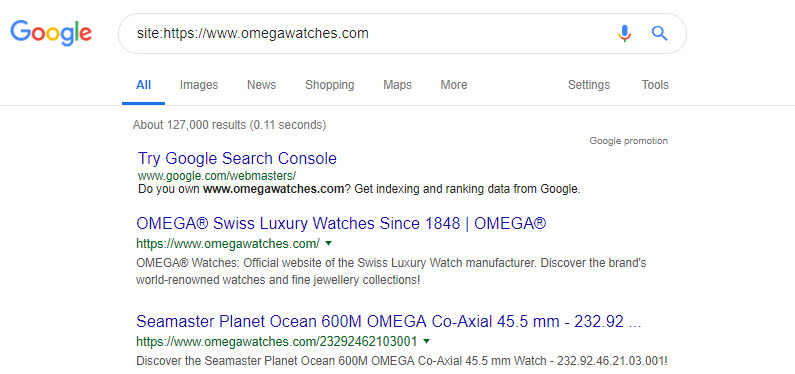
Let’s start with the site: operator. This query will give you some direction on how many pages are in Google’s index.
The number is always some way off (depending on the size of your website) but, it can give an early indication of the scale of that website. And, early insight into the size of the problems you’ll be addressing later.
We can check for any other indexed subdomains by adding -inurl:www..
This will show you all indexed subdomains on the hostname omegawatches.com excluding “www”.
You can add a minus to any operator to remove those matches from your query results, for example: -site:, -filetype:, -intitle:, and so on.
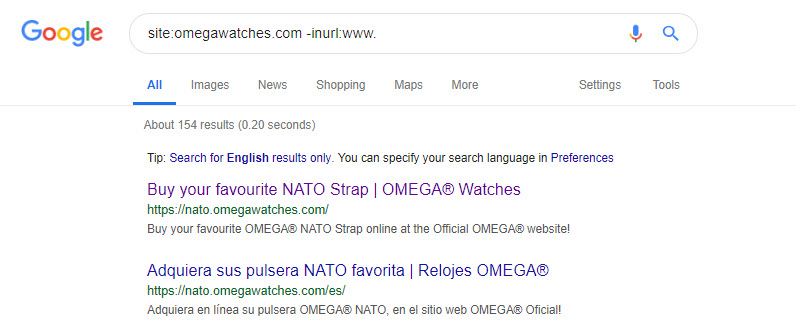
There are several indexed subdomains on this site, and all warrant some exploration.
Interestingly, the nato subdomain does have redirection setup, but the method is a 302. Perhaps the intention was to remove this subdomain from search results, but the configuration isn’t quite right.
Following the types of duplicate content I listed above, let’s see if we can find examples of each with the appropriate search query:
Duplicated home page, possibly at index.html / htm or index.php pages
If you want to look for copies of your home page, copy the contents of your title element or a block of text that should only appear on that page. Then, use this query:
site:omegawatches.com intitle:"Swiss Luxury Watches Since 1848 | OMEGA"
This is a useful operator to match strings that are only in the page’s title element, which can expose potential duplicates:

There are problems here to be solved – the .php version of this site’s homepage is unnecessarily indexed (and outranks the canonical and international versions of the same for some queries).
To be absolutely certain there aren’t any other legacy pages kicking around in the index, you could try:
site:omegawatches.com inurl:html OR inurl:php OR inurl:asp
You can get much the same results with the filetype: operator, too.
site:omegawatches.com filetype:html OR filetype:php OR filetype:asp
While we might be a little more certain that the only indexed duplicate of the homepage is at a .php URL, the search query does yield some interesting new results:
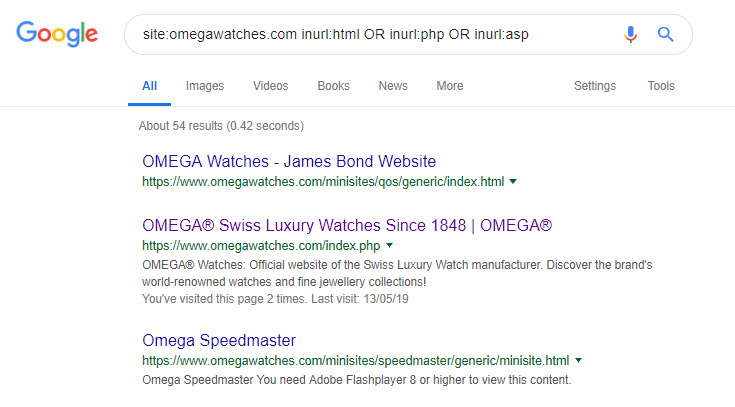
Flash microsites, orphaned and (obviously) now broken
I like the linearity of discovering technical problems while putting together an audit. I *might not* have checked for old pages with Flash content as a first port of call; but the process of exploration has led me down this path so investigate, I must.
Are there more versions of this page?

This query: site:www.omegawatches.com "You need to upgrade your Flash Player" might expose more!

6 Results, not as many as I’d have hoped for, but still 6 too many. As an aside I do think that old Flash content represents a gold mine of link reclamation opportunities, but I’ll leave that for another article down the road.
The same blocks of copy duplicated across your site
It’s really easy to find this type of issue; just wrapping the quotation marks around a suspect sentence delivers some insight:
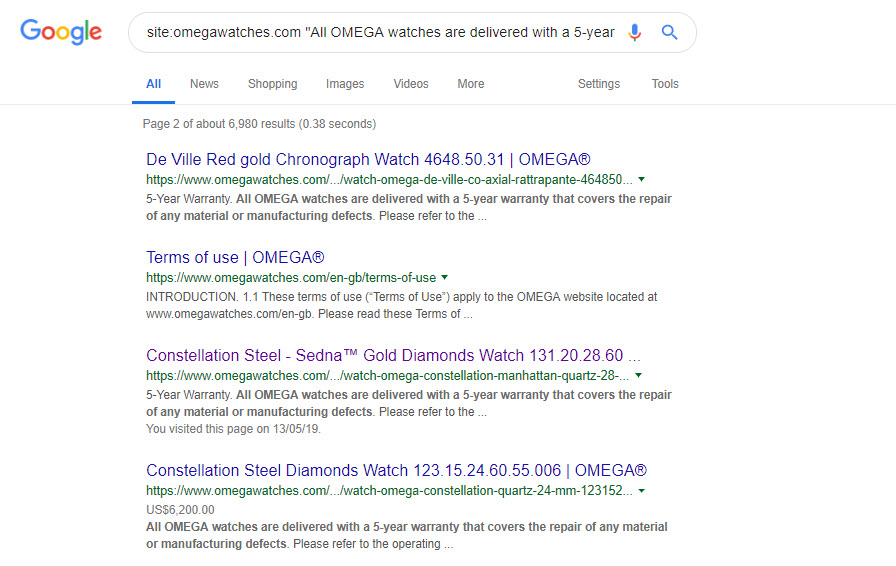
site:omegawatches.com "All OMEGA watches are delivered with a 5-year warranty that covers the repair of any material or manufacturing defects."
This website replicates their warranty information across every product page. I’ve tested removing boilerplate sections like this from large(ish) Ecommerce websites and it’s (in my opinion) a good thing to come up with another way to draw attention to warranty, guarantees and delivery terms without having huge amounts of identical text on every page.
The fix: if you’re repeating sections of text over and over again, perhaps those items need their own dedicated page.
Repetitive copy is sometimes unavoidable – although you should ask yourself whether the usual suspects (warranty, delivery, terms and conditions and so on) would be better if they lived on their own page. I think there’s a marginal benefit to this – if a large amount of your product page copy is duplicated tens of thousands of times over, or more – then it might be wise to move the repetitive content to its own page.
The same copy duplicated on external sites
That warranty text is heavily duplicated across a lot of horological retail sites and low quality reseller websites.
Worse, the manufacturer product descriptions have been copied by some retailers who have then distributed it via their affiliate networks.
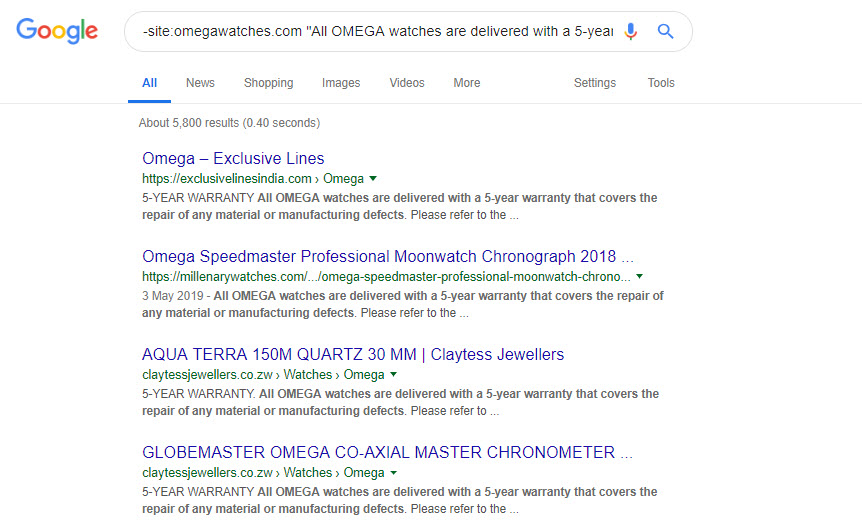
To expose the scale of the issue, just add a minus to the query from before:
-site:omegawatches.com "All OMEGA watches are delivered with a 5-year warranty that covers the repair of any material or manufacturing defects."
You can see reams of sites replicating that warranty copy below.
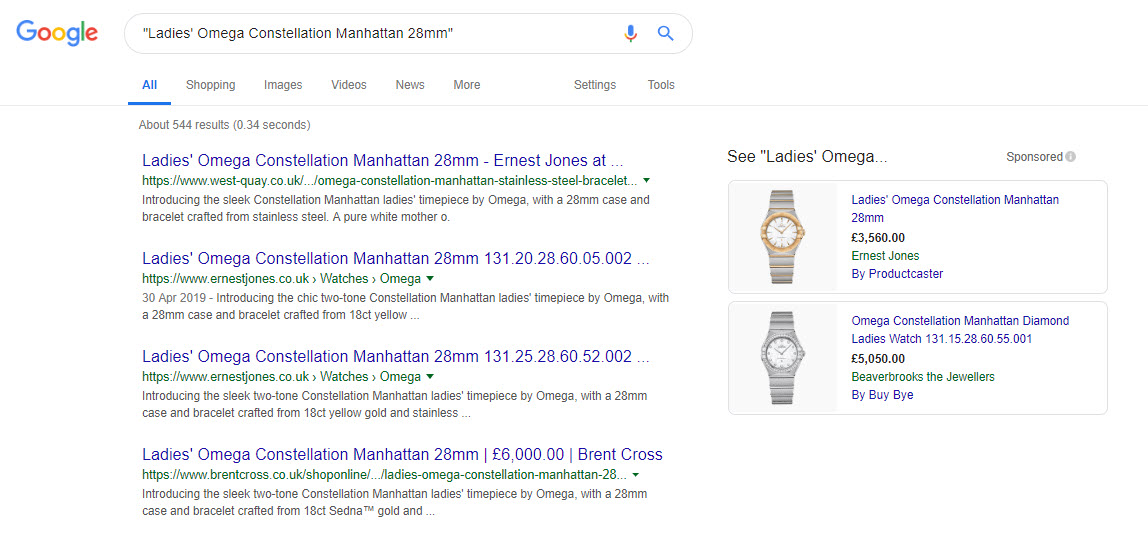
Similar queries expose the scale of the product content distribution.
Which is probably annoying when a handful of those sites are outranking you for your product names:
Which, brings us on neatly to the next issue.
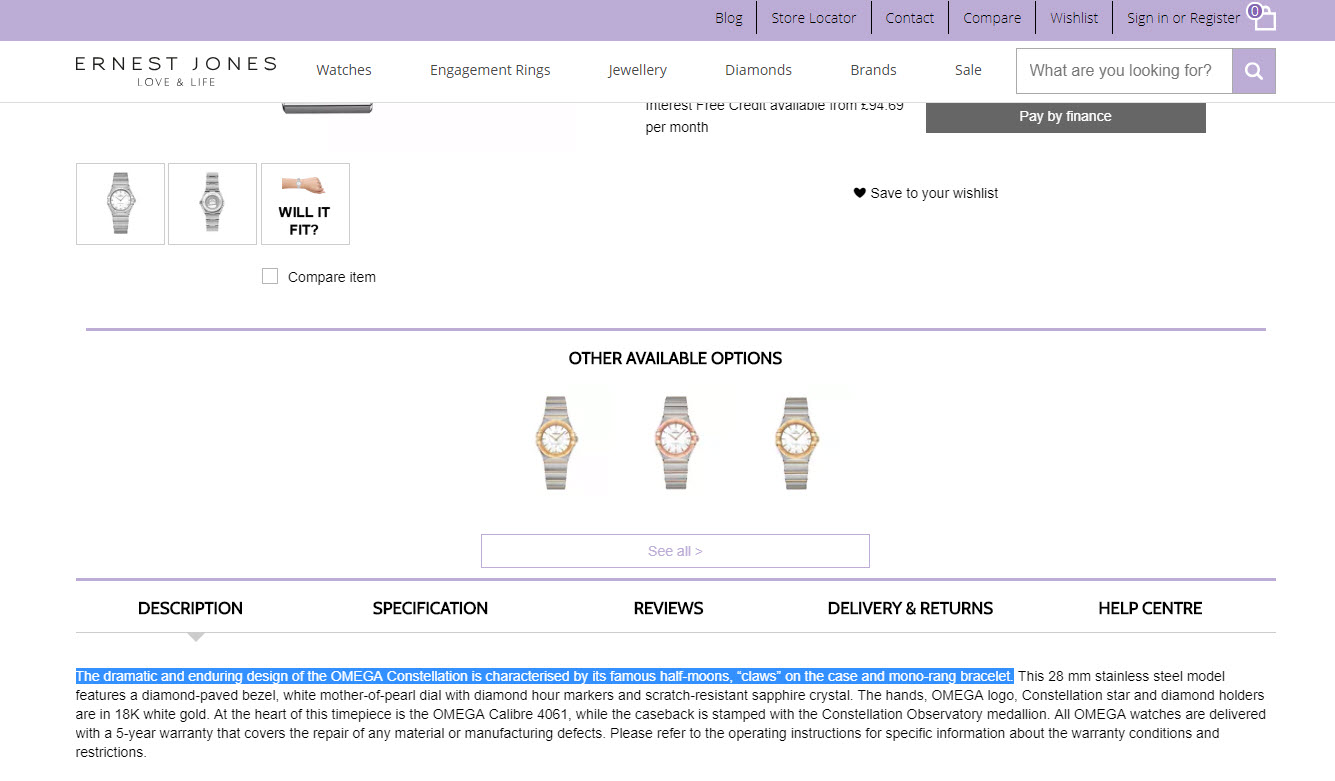
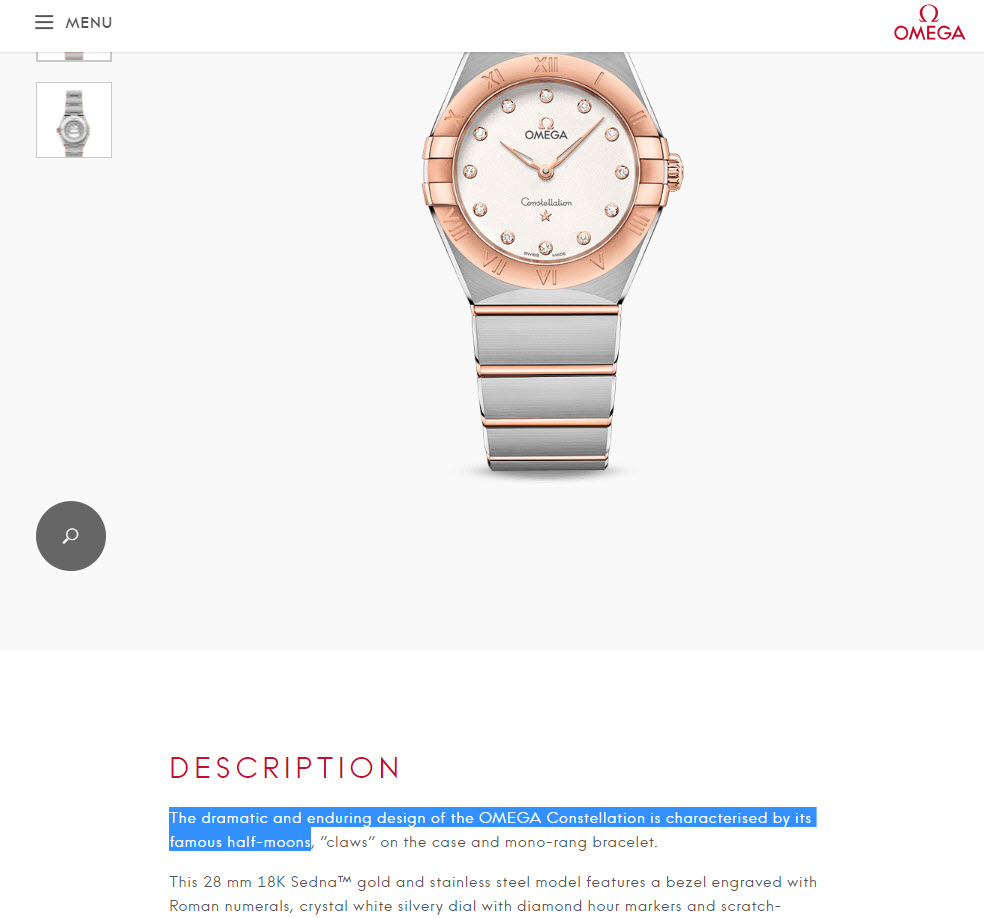
Product copy reused from the original manufacturer source
This retailer is replicating the manufacturer copy on their product pages.
Here’s the original manufacturer copy:
The fix: You should do whatever is possible to write your own product copy
My view on this is that while you’re duplicating someone else’s content you’re at the mercy of the next Google update. Product page optimisation is an incredibly valuable, yet often overlooked aspect of retail SEO. You should do whatever is possible to write your own product copy.
By using duplicate content on your own site, you’re exposed in a competitive context – another, better page will come along one day and undoubtedly be able to outrank you. Quite easily, unless you’re Amazon.
As a new entrant to market it’s easy to spot niches with a competitive opportunity by identifying search results that are comprised mostly of scraped manufacturer copy.
There’s a growth opportunity for Ernest Jones simply by optimising and rewriting their product pages and category pages.
Not sure which pages to tackle first?
Head to Search Console’s Performance report and filter by subfolder, then sort by impressions. This is the best proxy to potential for those pages for a rewrite priority list. Drill down by keyword for the rewrite process.
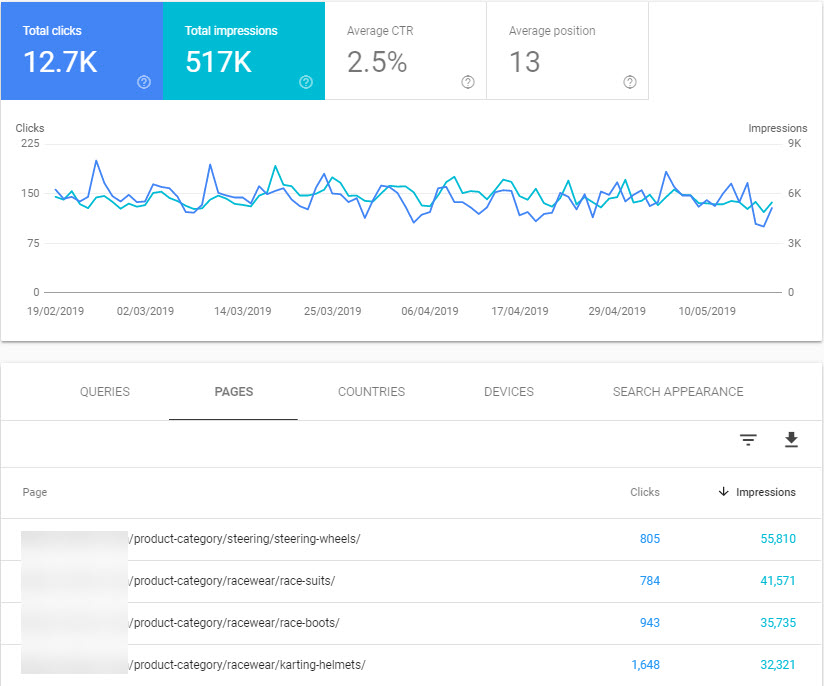
A list of category pages for rewrite in Search Console’s Performance report. Can be used for product pages too!
Faceted navigation where sort, filter, attribute and display parameters are accessible to search engine crawlers
Faceted navigation is something my esteemed colleague Maria Camanes has written about before. I recommend you read all of her work!
In faceted navigation or heavily search driven websites (such as property, automotive or jobs sites), duplication occurs when parameters that would filter, sort or arrange the products on a category page become indexed by Google.
Let’s take a look at some examples.
Indexed query parameters
Whenever you’re exploring a site for the first time, it’s wise to take note of the parameter format used for filters and sorts in the faceted navigation section of the site. You can discover all sorts of issues, ready to tackle in your technical recommendations.
John Lewis is a powerhouse in British retail, but their site performance certainly doesn’t look rosy. When I see something like this I see an awful lot of online revenue growth, wasted:
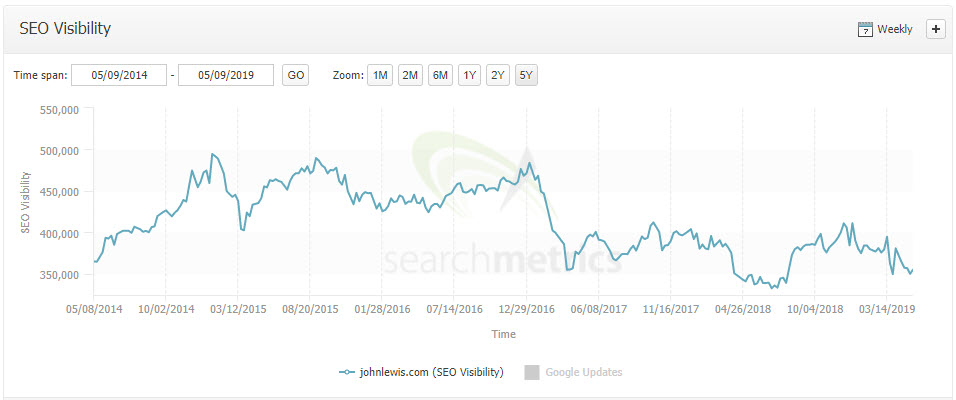
Source: Searchmetrics
Browsing their site you quickly note the following types of parameters in use on their category pages:
?SortBy=?ShowInStockOnly=?price=
And so on.
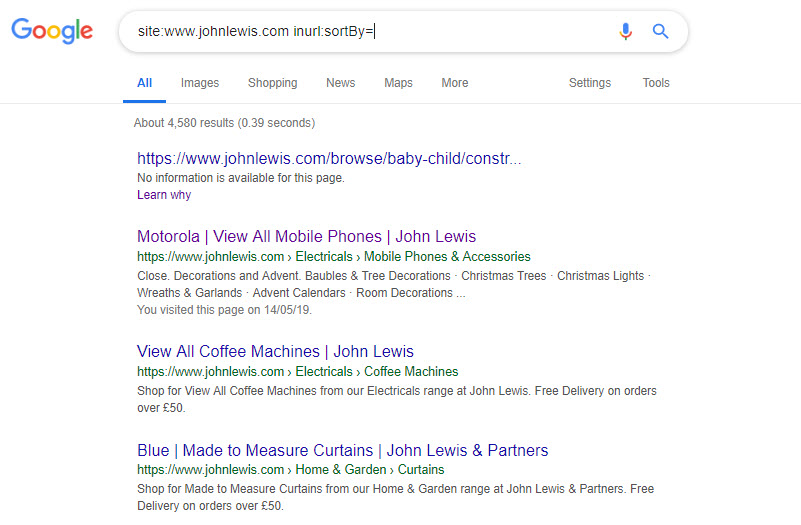
To identify when, and if those parameters are indexed and causing duplicates, head to Google and use a query like:
site:www.johnlewis.com inurl:sortBy=
Which yields a lot of indexed pages:
You could try removing some parameters from the results with a more complex query:
site:www.johnlewis.com inurl:sortBy= -inurl:ShowInStockOnly=
and so on.
The version of robots.txt on their site (at the time of writing) would indicate that indexed parametererised URLs is not a desired situation. But, because of an error in the file, some of their rules aren’t working as intended.
But I digress. To check to see how badly pages are being cannibalised through duplication, I would drill down by a particular category:
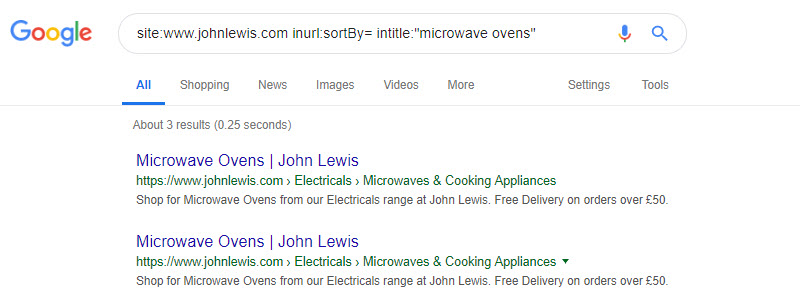
These pages are the same (just with different parameters in the URL). They’re additional to the canonical URL.
The fix: Use noindex, wait for the pages to drop from the index and then block with robots.txt rules
When I have to address a large number of indexed URLs using sort parameters, I tend to break down the approach into two stages.
Firstly, set any non default URL (the parent category that has sorts and filter parameters active) to noindex.
Then, when the pages have dropped out of the index, create a set of robots.txt rules to keep them from being crawled.
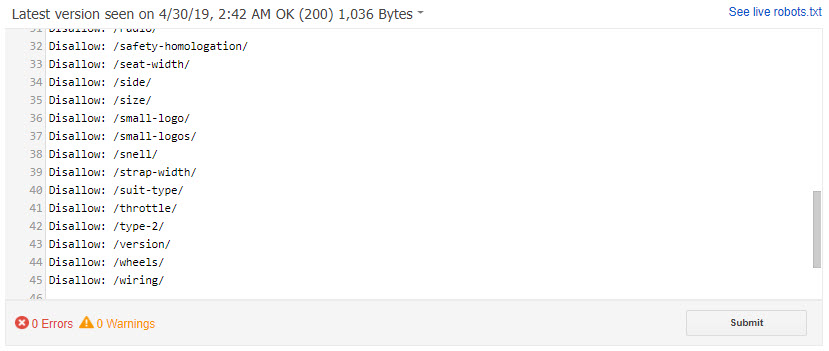
A set of robots.txt rules created after a Woocommerce site created hundreds of indexable attribute URLs.
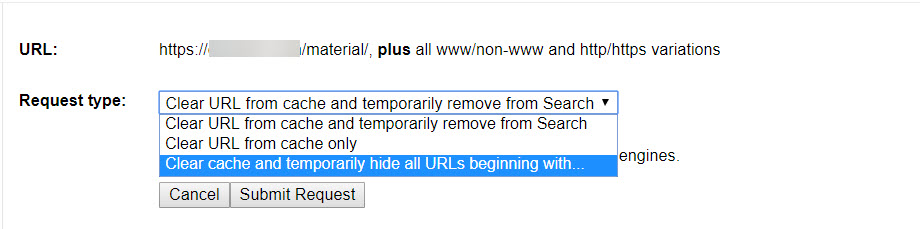
In the past, if it’s a bit urgent I’ve relied on the URL Removal tool found in (old) Search Console. Hopefully this feature will find its way into the new one!
Blank category pages
In one of my queries above, I noticed that there were a few 0 (zero) results category pages like this:
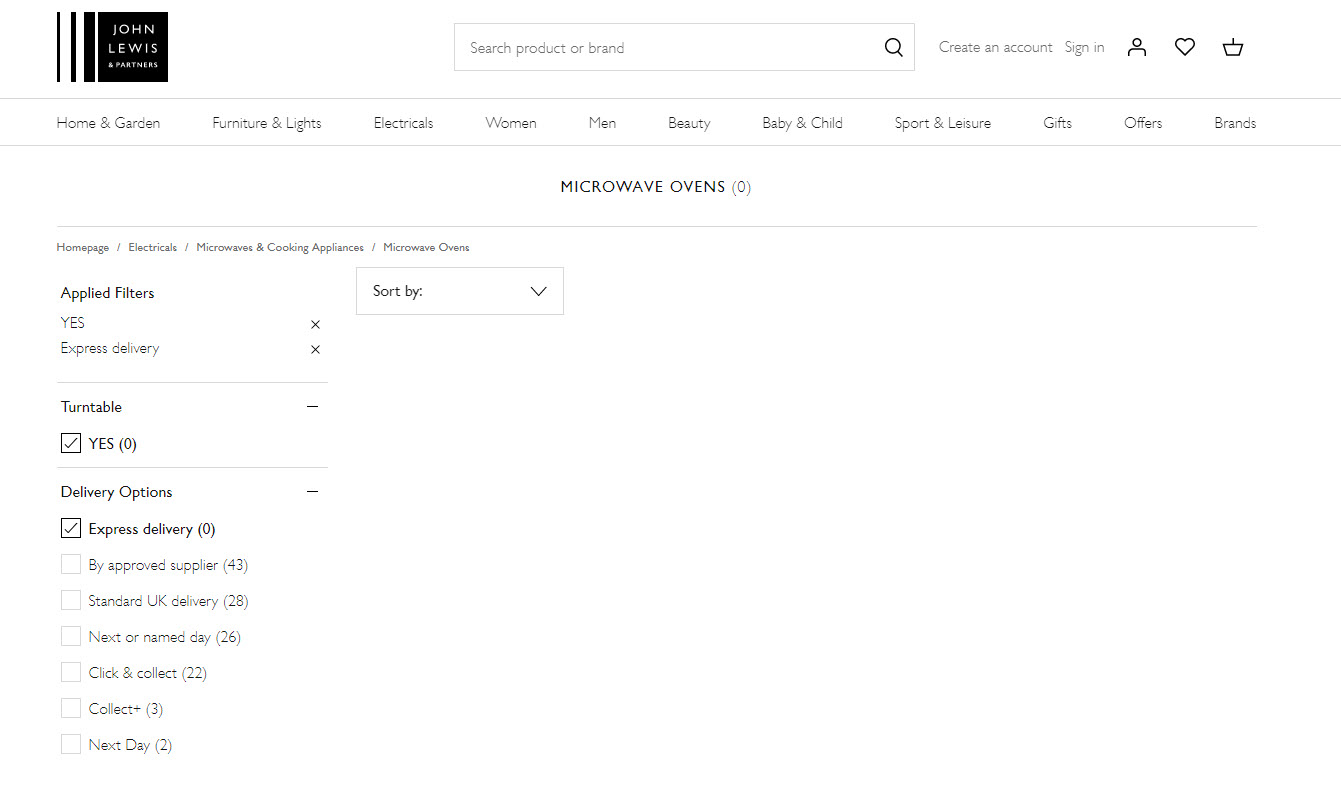
This query exposes many zero results category pages:
site:www.johnlewis.com "Microwave Ovens (0)"
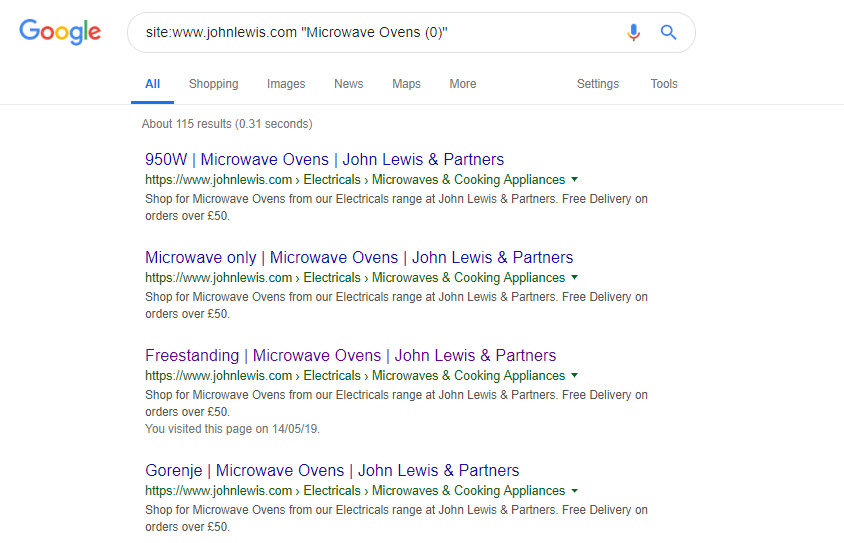
I’m reasonably certain that the multiplier added by just these few problems alone is in the hundreds of pages per every filter and brand on every category page on the whole website. That’s my drive by opinion of course, I spent 10 minutes on this problem.
The fix: Reduce indexing of granular attributes, set zero results pages to noindex until populated
You might not be aware that you’re a retailer with lots of blank category pages.
So the first port of call would be to devise a method to crawl the site externally using Xpath queries to detect and report on certain page types. You may have access to your technical team, who might be able to run some database queries for you too.
At some point in the design of a category page’s UX, you’ve got to consider if too many filters, sorts and attribute filters are available to crawl. Is your faceted navigation just too granular for search engine indexing?
I’d suggest drawing a line at a certain level of attribute depth, setting the excess pages to noindex, followed by an appropriately timed update to disallow some attribute types in your robots.txt file.
Or, you could temporarily set zero results pages to noindex, until they’re re-populated. Database complexity in large sites can be a big problem, and in this situation a good pruning process to remove the unnecessary pages might be a good decision.
Excessive reuse of content or snippets of content in a paginated series
Paginated pages in series are in essence, near duplicates of each other. But to be legitimately not duplicates, the content displayed on them has to change. This statement is completely obvious; you’d expect to get different products or blog posts on retail categories or blog category pages.
But something occurred to me when I saw text highlighted in the excellent and free tool, Siteliner (more on tools later).
The tool highlighted a snippet of boilerplate text which, is reused across every category page on the site. It’s also replicated on the blog home page and, along the paginated category series. That’s excessive duplication on a site that should really know better. Each category page needs it’s own, relevant to subject content. A blog home page is an opportunity to drive traffic, too.
The fix: Category pages should always use unique content>
It goes without saying that you shouldn’t repeat the same blocks of text on different category home pages.
As a best practice, I also recommend that in a paginated series, pages 2 and up display none of the body copy you’d expect to find on the first of the paginated series:
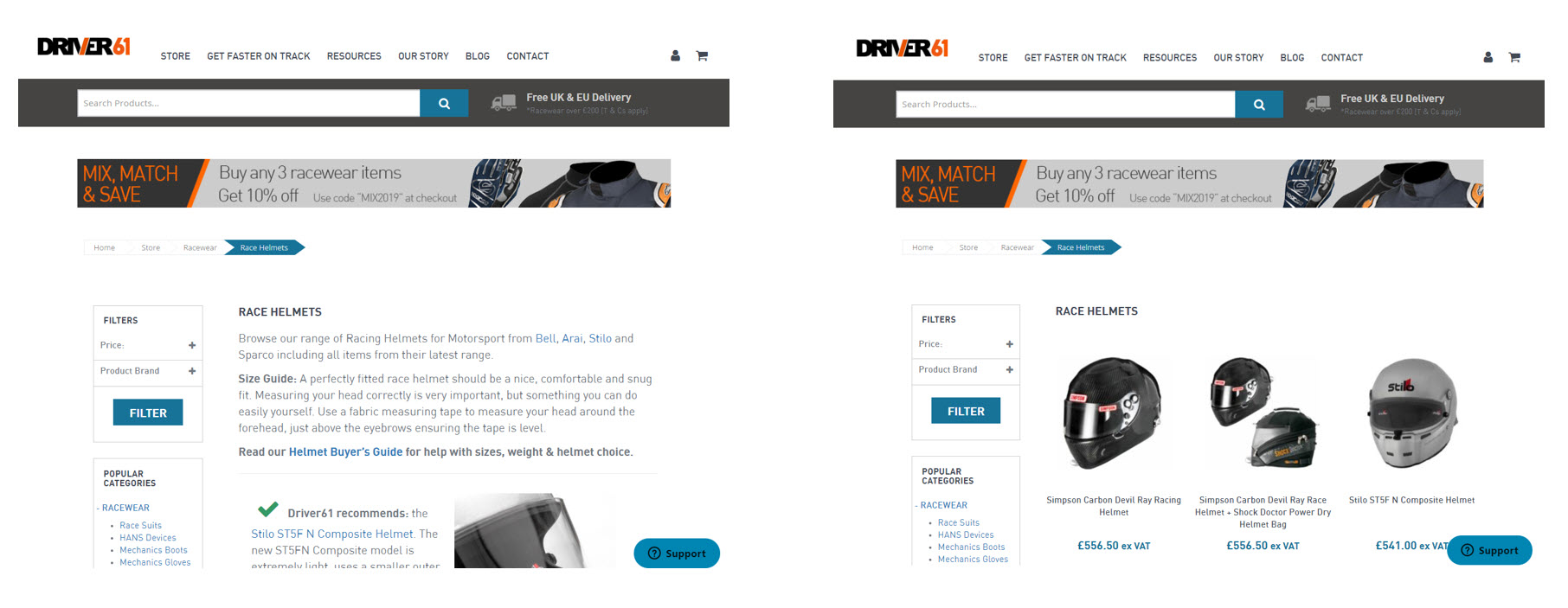
The first page (left) vs the second page in a paginated series on a retail category.
Analytics tracking parameters on internal links
Don’t add analytics tracking parameters to your internal links. Because if you do, you’re going to have to rely on your canonical tags to help Google decide which is the preferred URL in organic search.
If that doesn’t work, all of your analytics data will be wrong.
Here’s a very interesting example of a site with indexed utm_ parameters. Bon Prix pass utm_source parameters into their faceted navigation section. Worse, it’s dynamic. So, if you change utm_source=affiliatewindow to utm_source=hello in the browser’s address bar, the site will update all internal links to match.
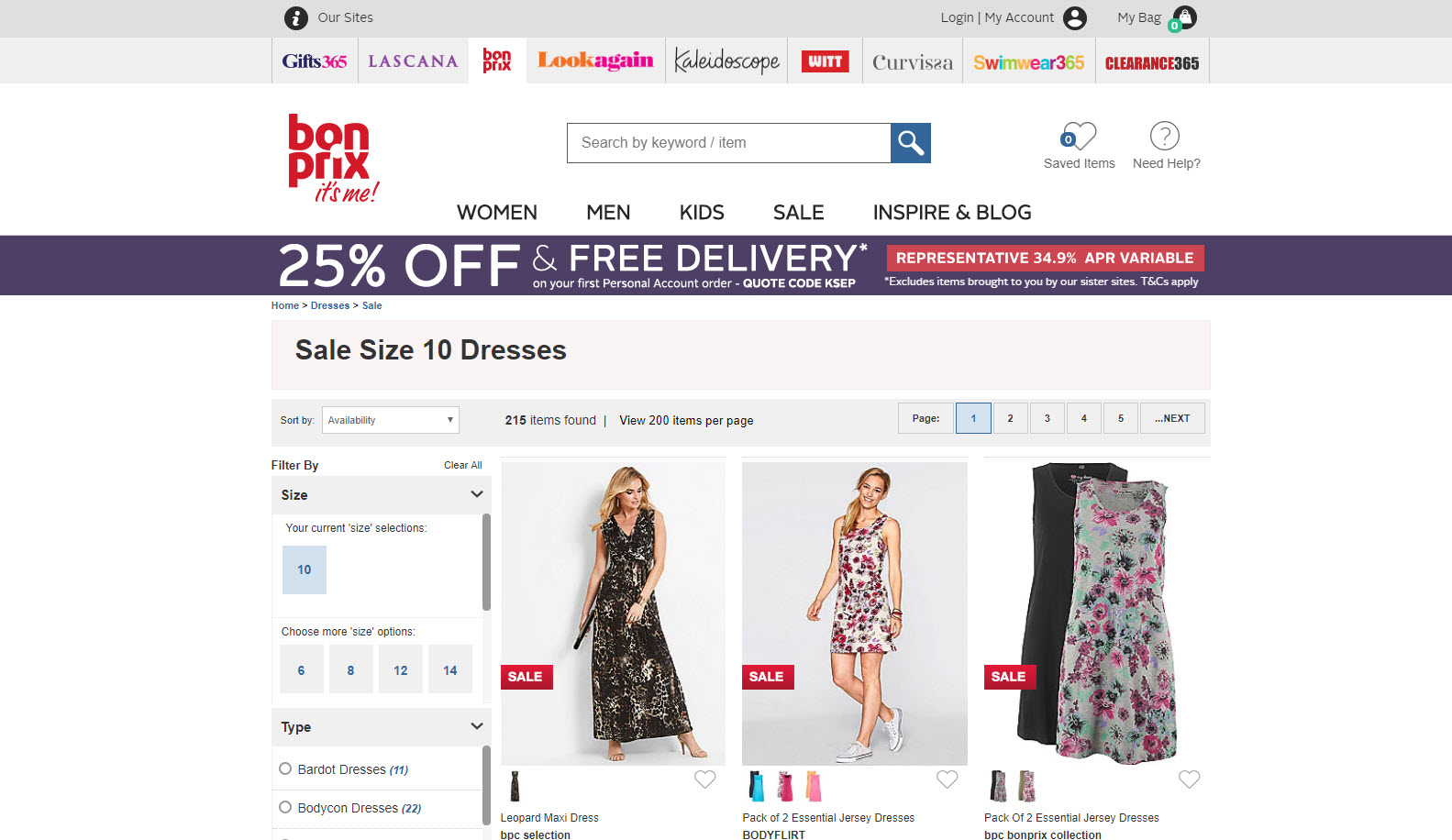
Whatever parameters are added to the end of the url also get included in the canonical. Marvellous.
The fix: Don’t use analytics tracking parameters on internal links
The golden rule here: Don’t add analytics tracking parameters to your internal links, unless you’re using Tom’s excellent solution here.
Whatever parameters are added to the end of the URL, you really don’t want your server to accept them and update the page source. In this website’s case the canonical reference is updated with the new parameter. That’s not good. It makes the site look like it may be susceptible to an XSS Attack, where the URL can be manipulated to inject unsanitised code into the site. An extreme example being much like Tom Anthony’s recent discovery here.
Dynamic search pages that create (millions of) indexable urls
If any query can be added on to the end of a search URL and get indexed, your site could be attacked with nothing more than a dictionary relatively easily.
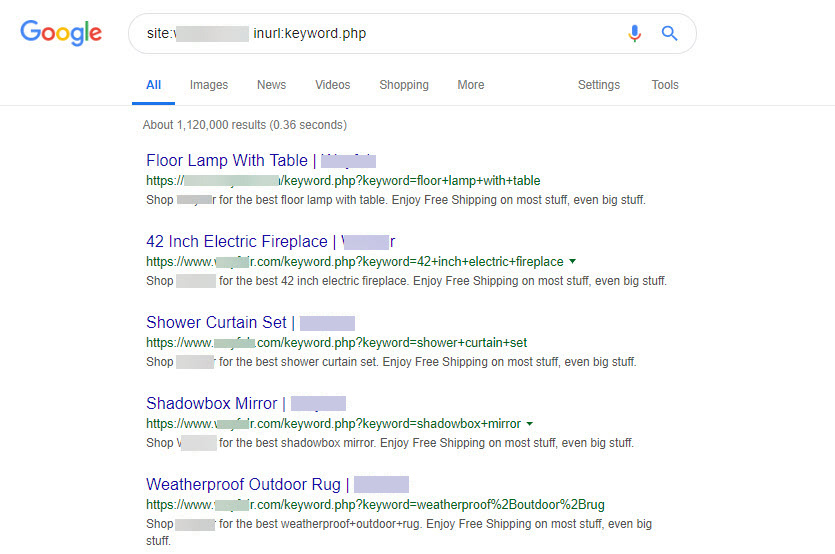
Here’s an example of one of the pages:
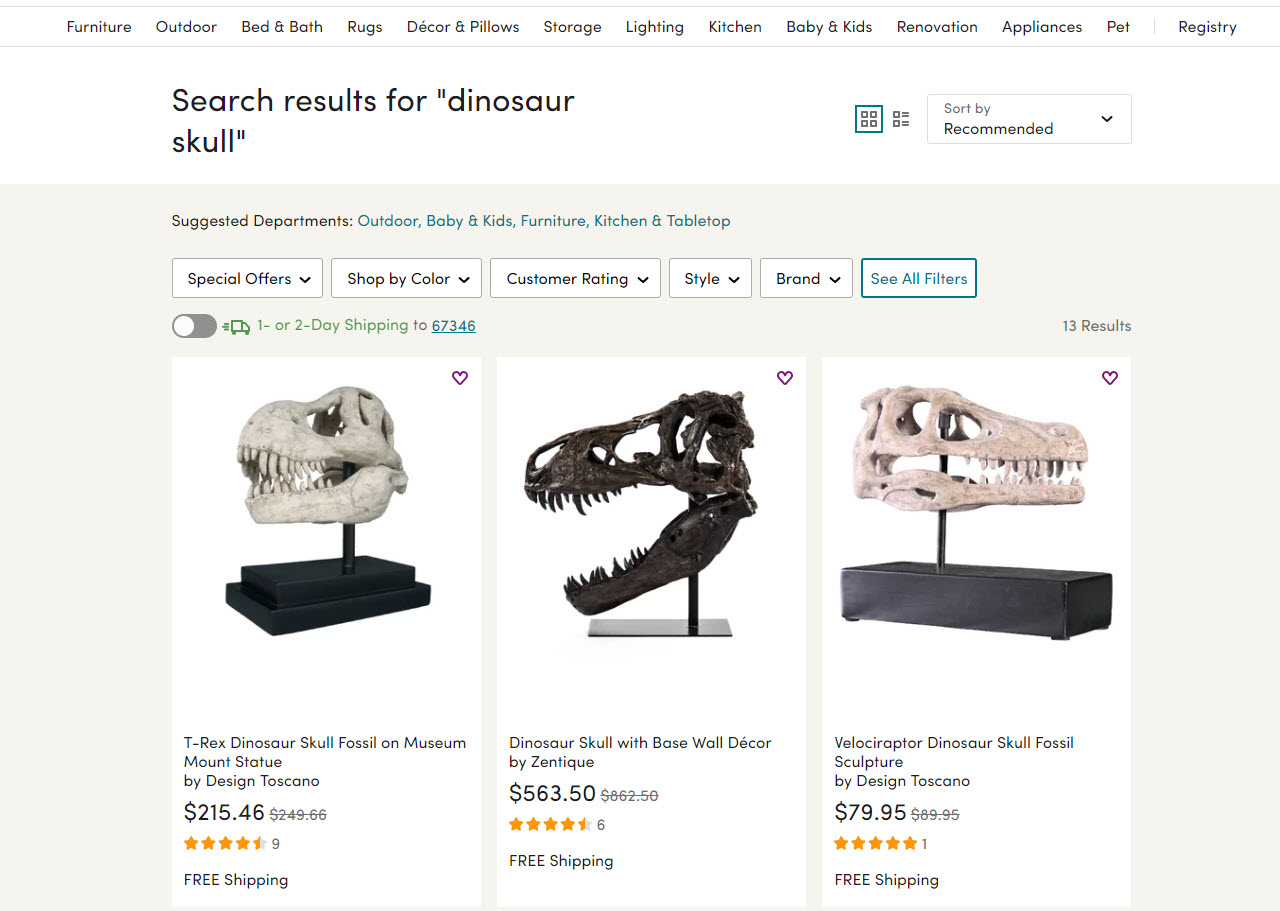
As there are so many I took an interest in how recently the pages were discovered:
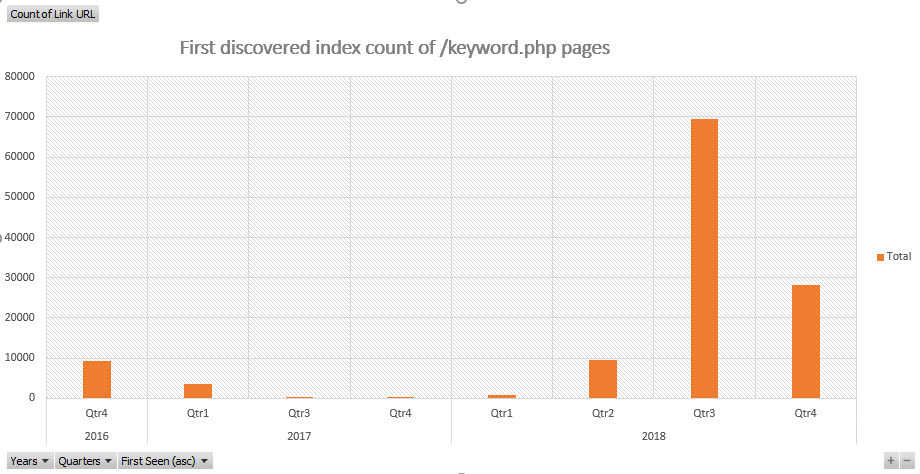
When were pages containing keyword.php first discovered? Source: aHrefs internal back links data.
The fix: Set your dynamic search result pages to noindex or develop the pages with traffic potential
If you don’t want your search results pages indexed, set them to noindex. The issues with indexable search results pages is they can be made to rank for keywords you’d rather not allow your brand to be associated with.
Otherwise, there’s value in identifying pages with good rankings and traffic potential and developing the content on those pages so they’re not such a high risk strategy.
Alternate version pages: print friendly pages or text only accessible pages
Here’s an interesting issue on the alamo.com website. A number of printer friendly templates for customer booking confirmations are indexed:
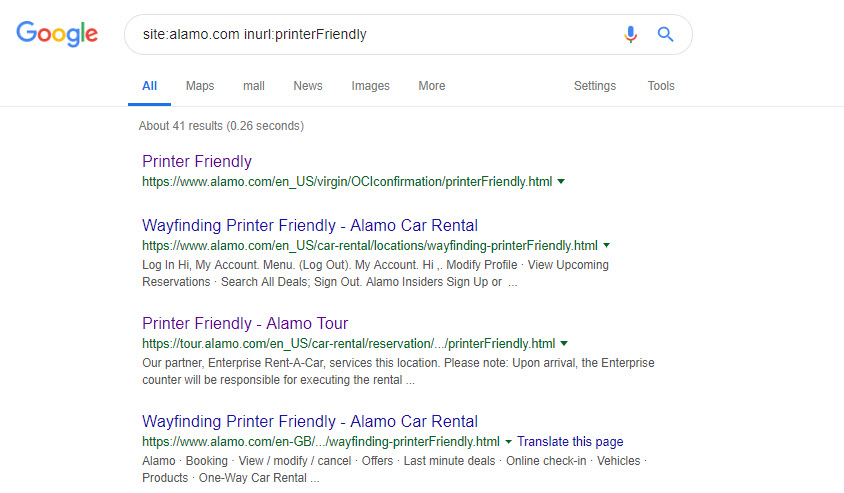
Frankly I’ve never come across this issue in a real life audit; as the print friendly version should be done with an alternate CSS file.
The fix: Alternate version pages – use CSS to style the original page or set the alternative page to noindex or rel="canonical"
If your printer friendly page is available at a separate URL, I would probably just use noindex and forget about it. Alternatively you could use rel="canonical" to the original page if the two pages were exactly the same. My safe money would still be just to noindex the page.
Inconsistent URL casing, inconsistent handling of trailing slashes and www redirects
Whatever your technical strategy, it’s important to handle casing, trailing slashes, www redirects and http to https redirection consistently.
Access your site at a mix of urls to test for the outcome:
| URL | Expected Behaviour | OK? |
| https://builtvisible.com | 301 Redirect to https://builtvisible.com | Yes |
| https://www.builtvisible.com | 301 Redirect to https://builtvisible.com | Yes |
| https://www.builtvisible.com | 301 Redirect to https://builtvisible.com | Yes |
| https://builtvisible.com/blog | 301 Redirect to https://builtvisible.com/blog/ | Yes |
The older the website, the more likely it is you’ll encounter links to alternative versions of your preferred URLs.
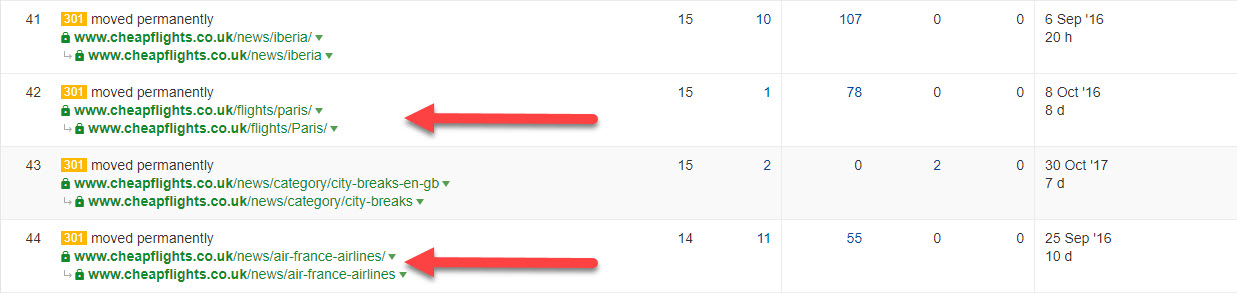
This “Top Pages by Links” report from aHrefs.com shows how the Cheapflights.co.uk website has inbound links to differing case and trailing slash configurations of their pages. Cheapflights are a little unusual as they redirect title case location names into the URL (for example, “paris” would redirect to “Paris”). While today’s version of their website is very consistent, there’s a large legacy of different versions of the same URLs. This makes it all the more important to crawl legacy URLs with inbound links to ensure the correct redirect rules are kept in place.
Without those rules, there’s always a chance that the CMS will allow the page to duplicate at the (slightly) different URLs.
The fix: Set a strategy and stick to it
Make sure all of your internal links only link to the preferred version of your URLs. Make sure there are no inconsistencies on your trailing slash, www, http/https links and URL casing. Also avoid internal redirects where possible.
Tools like Screaming Frog can get you the data you need and analysis in tools like Excel with Fuzzy Lookup can help you match near similar URLs at a reasonable scale. For big scale work in Excel, use how to load more than 1 million URLs into Excel. By that point, you’re probably already doing this from log file data and have a method you’re already comfortable with.
The technical analysis and eventual fix is only part of the solution.
Organisations need consistent redirect rules setting. Defining a strategy and publishing it organisation wide would go a long way towards getting people to link properly. It’s always a little disappointing as an SEO to see new internal links without trailing slashes, or without the proper casing. I think these issues are tackled with the right education and organisation wide buy-in to your SEO plan.
Thin / boilerplate retail category page content.
The thing about boilerplate content is this: it’s weak, it doesn’t sell and in the end, it’ll hurt your rankings.
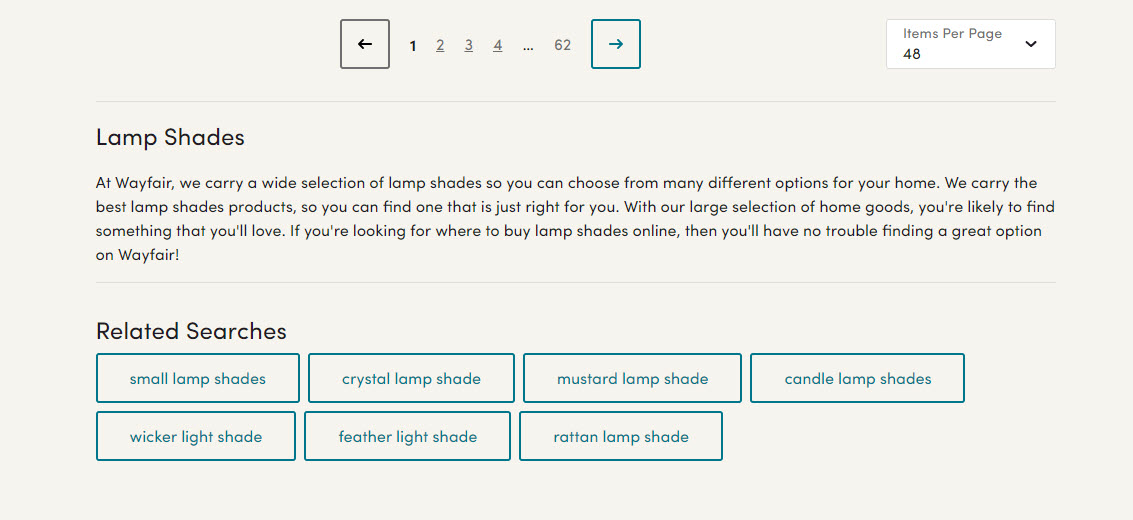
“If we hide this copy at the bottom of the category page, maybe no one will notice.”
Here’s that boilerplate:
At Wayfair, we carry a wide selection of [product-category] so you can choose from many different options for your home. We carry the best [product-category] products, so you can find one that is just right for you. With our large selection of [parent-category], you’re likely to find something that you’ll love. If you’re looking for where to buy [product-category] online, then you’ll have no trouble finding a great option on Wayfair!
The footprint for this type of tactic is very easy to detect:
site:wayfair.co.uk "At Wayfair, we carry a wide selection of" "products, so you can find one that is just right for you"
A query that yields 8,900 or so results:
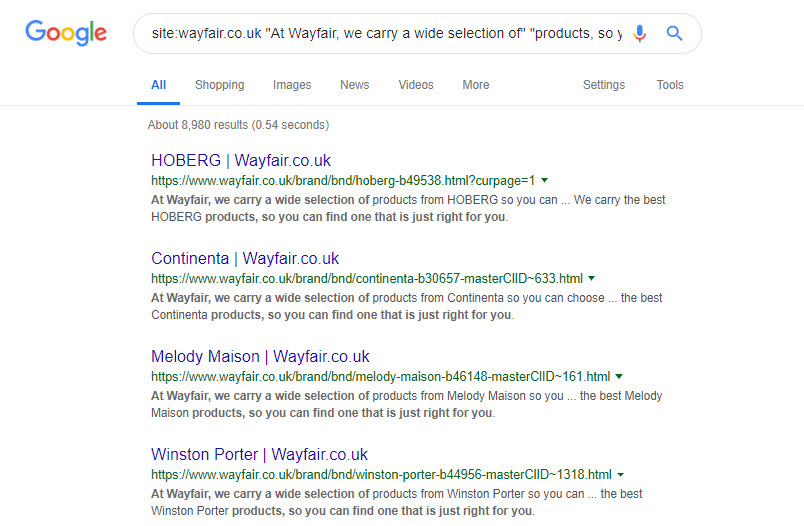
The fix: Developing your category pages
I’ve written about the immense power of developing your category pages as a retailer. It’s a long, iterative job that (for a site the scale of this) would require an awful lot of buy in. But it’s not impossible though good category management.
Ultimately, better category pages means better traffic growth – I would urge a site like this to consider proper category layout, ownership and authorship very carefully.
Duplicate content caused by inbound links
Some sites just don’t link to you in the way you’d like. Sparktoro trending seems to lop off the trailing slash on their outbound links.
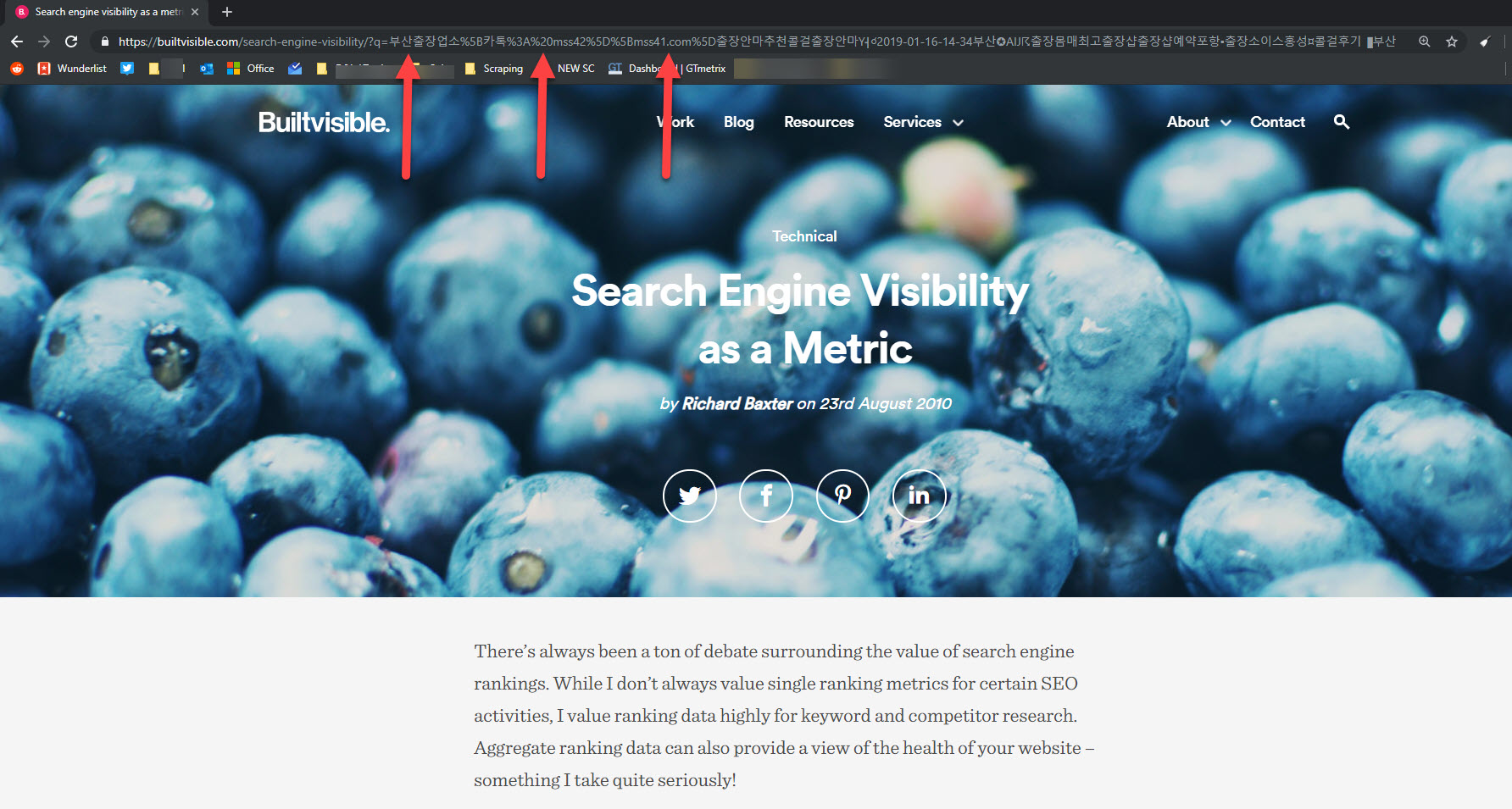
But that’s all a harmless annoyance compared to the thousands of toxic inbound links to Builtvisible that were doing this:
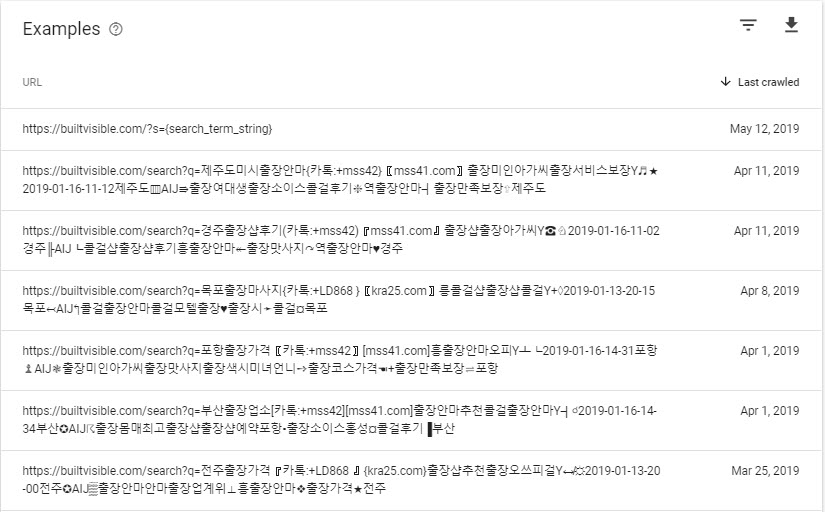
While these links should have been causing 404 errors, there was a redirect rule catching them some how, resulting in duplication of this article:
The fix: Block / remove or redirect
There were so many of those toxic links that I decided it was right to block this (non standard and unused) /search?= with a robots.txt wildcard, and then remove all offending URLs with Search Console’s URL removal tool.
This dropped the number of indexed pages from ~2400 to 55 (and dropping) in a reasonable timescale.
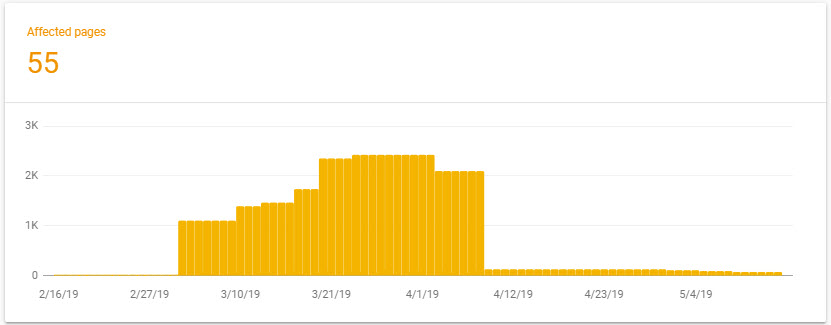
But if the inbound links are of a high quality, then a redirection strategy should mop up the issue.
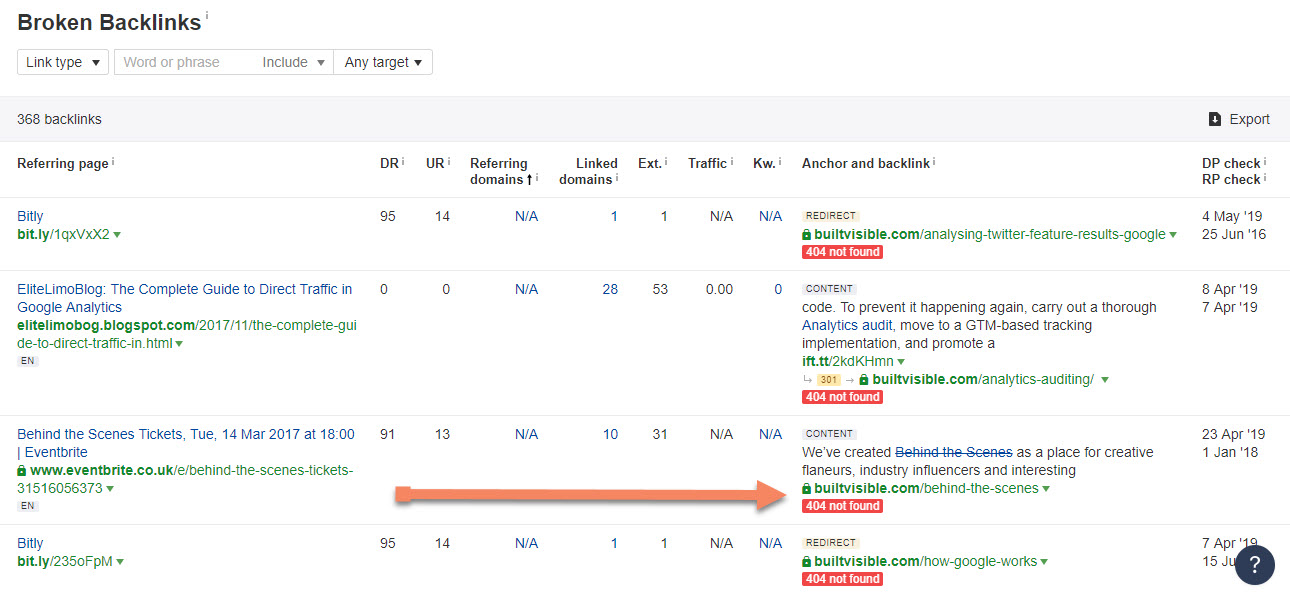
aHref’s Broken Backlinks report can be used to identify inbound links pointing to broken URLs. Spot the patterns – it might be worth reviewing your global redirect rules, like this missing trailing slash via eventbrite.co.uk
Indexed staging site and development sites
Indexed staging and development sites are definitely not ideal. Aside from the SEO implications of having numerous copies of your content indexed, you can find yourself accidentally announcing new product launches and price changes ahead of the PR schedule.
I found a large number of brands with indexed development and staging servers, but this one I’ll do something about and drop the RNIB a line to explain:
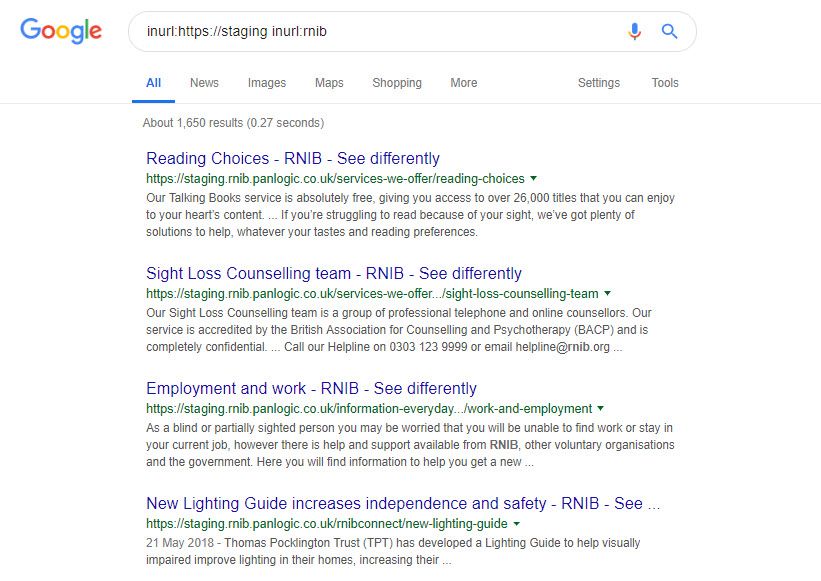
The fix: Remove your indexed staging site and development site URLs
The only way to keep your staging and development environments out of Google is to set up http authentication using https.
That way, anything accessing the development or staging site *has* to use a username and password. Tools like Screaming Frog and Sitebulb support authentication so you can still crawl the site. You could also IP restrict access for even further security.
If your staging site has already been indexed, being pretty honest if it’s easier to change the url, move the thing to authenticated access only, then do that.
Respond with a 410 gone response at the old url and it’ll drop out of the index quickly and easily.
Failing that, verify the staging site in search console, set the entire site to disallow in robots.txt and remove the entire site with the URL removal tool.
You could respond with a 410 if the visiting user agent is a search engine but if you’re willing to engineer something as complex as reliable user agent detection with a conditional server header response you might just as easily change the entire staging url.
Finally, you could set a noindex in X-Robots in the http server header response to wait for it to drop out of the index. This would pose a risk should that feature find its way into the live environment, which is altogether possible!
Product page accessible at multiple category or sale offer URLs
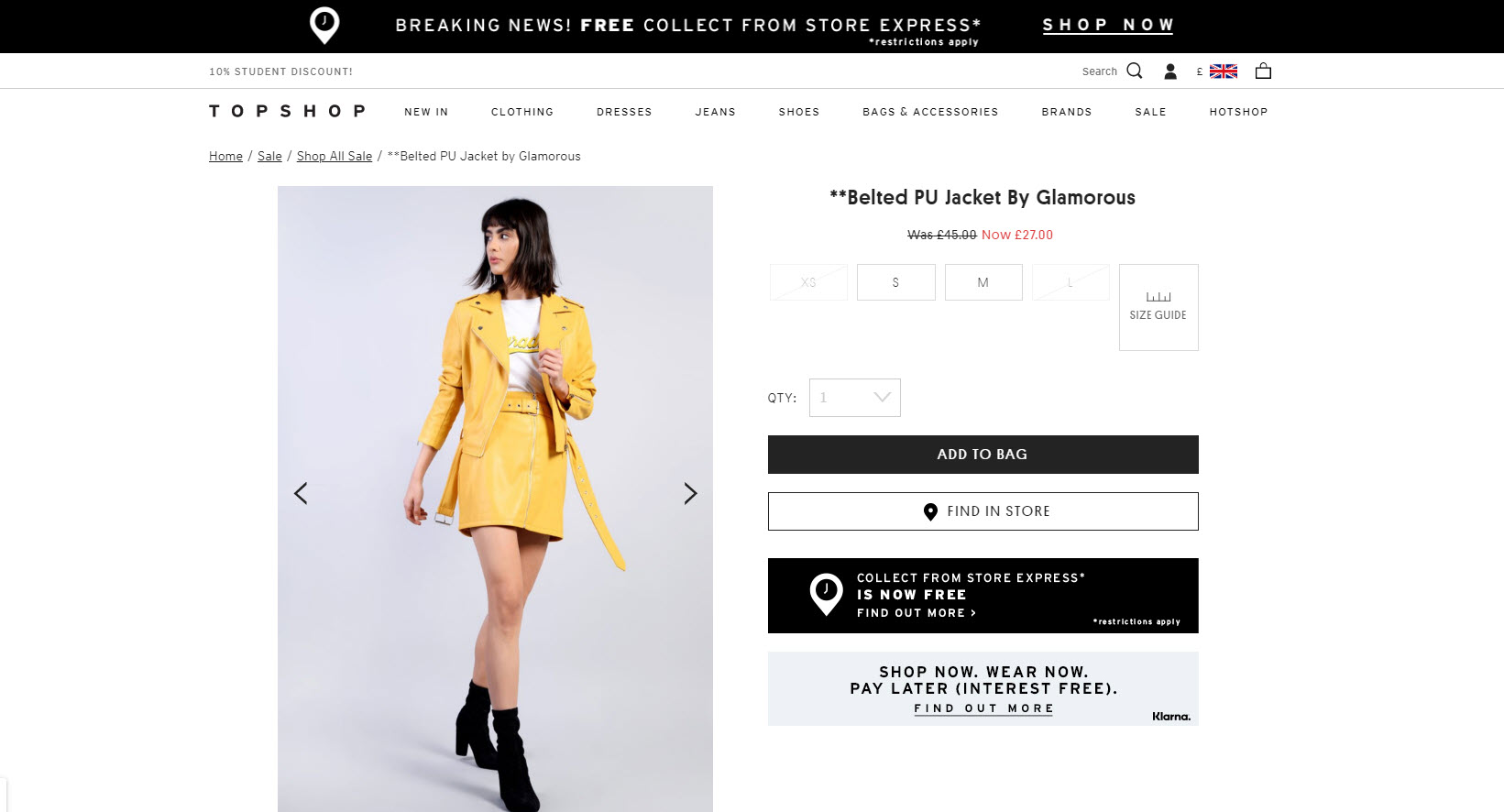
When a retailer starts a seasonal sale, they can inadvertently recreate their sale products at entirely new URLs. This is usually because their CMS adds the product to a /sale/ category page, where the category URL forms part of the product URL.
The fix: don’t change the product URL or use rel=”canonical”
If you can possibly avoid it, don’t change the product URL. If that’s not possible, rel="canonical" is a reasonable alternative.
When items go on sale at Topshop.com, the product URL is duplicated at a sale offer URL. However, the origin URL is stated in the rel canonical:
Sale URL: https://www.topshop.com/en/tsuk/product/sale-6923952/shop-all-sale-6912866/belted-pu-jacket-8349790
Canonical: https://www.topshop.com/en/tsuk/product/belted-pu-jacket-8349790
Tools
SEO tools almost always identify new problems you didn’t know you had. They’re all very different, too. But each one will identify something curious that should make you think and want to investigate further.
SEO tools don’t provide the definitive answer to all of your technical problems, neither do they provide the solution. But they’re very good at highlighting items you should apply your yourself to fixing using whatever technical solution you see fit.
Ryte
Ryte is a powerful all-in-one SEO toolset with an extensive library of features for day to day technical SEO. One of the highlights is the duplicate content tool:
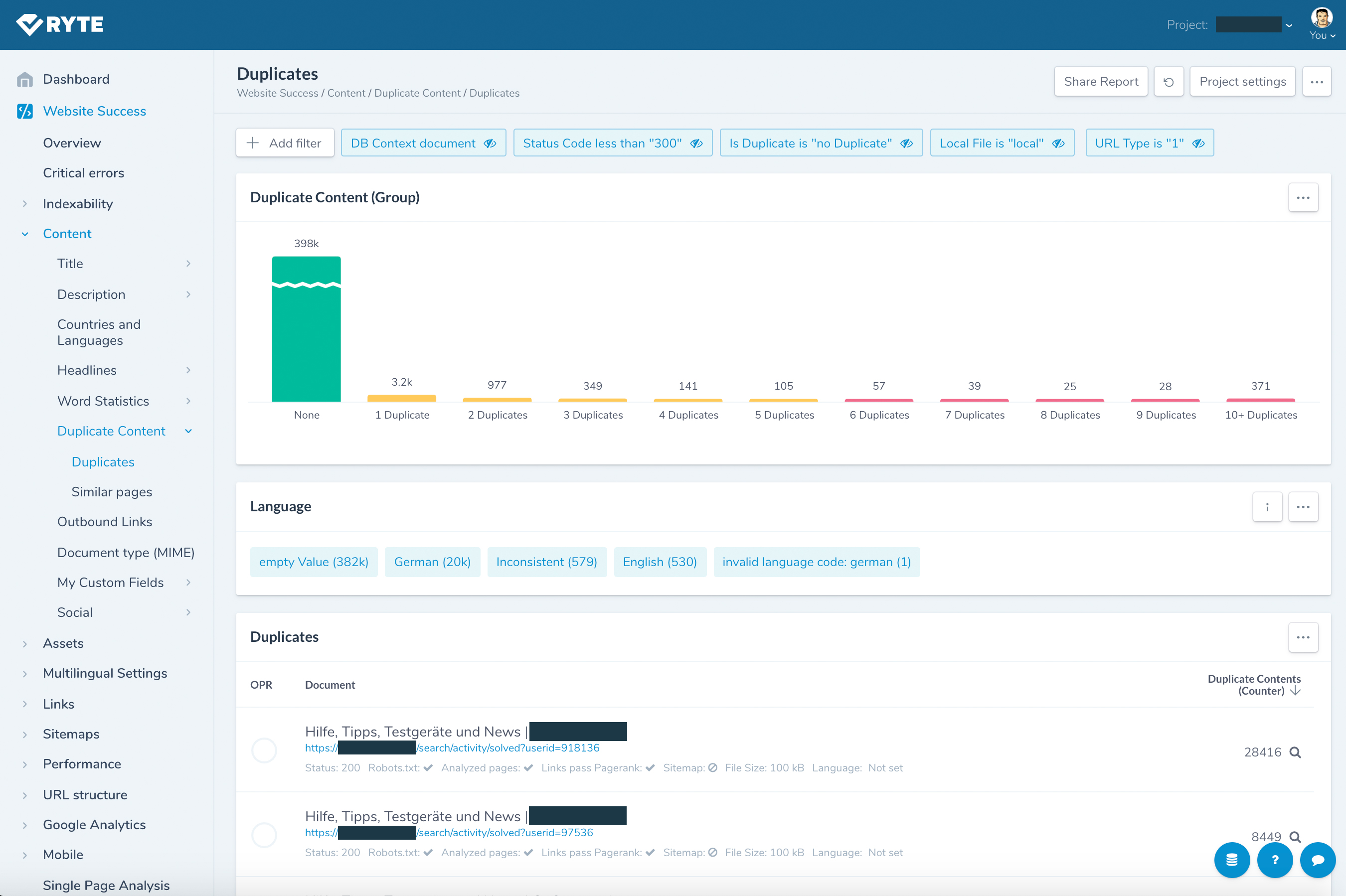
Ryte can detect and report on:
- URLs with duplicate content
- URLs wUith near duplicate / similar content
- URLs with duplicate page titles, meta descriptions and/or H1 tags
- URL duplicates
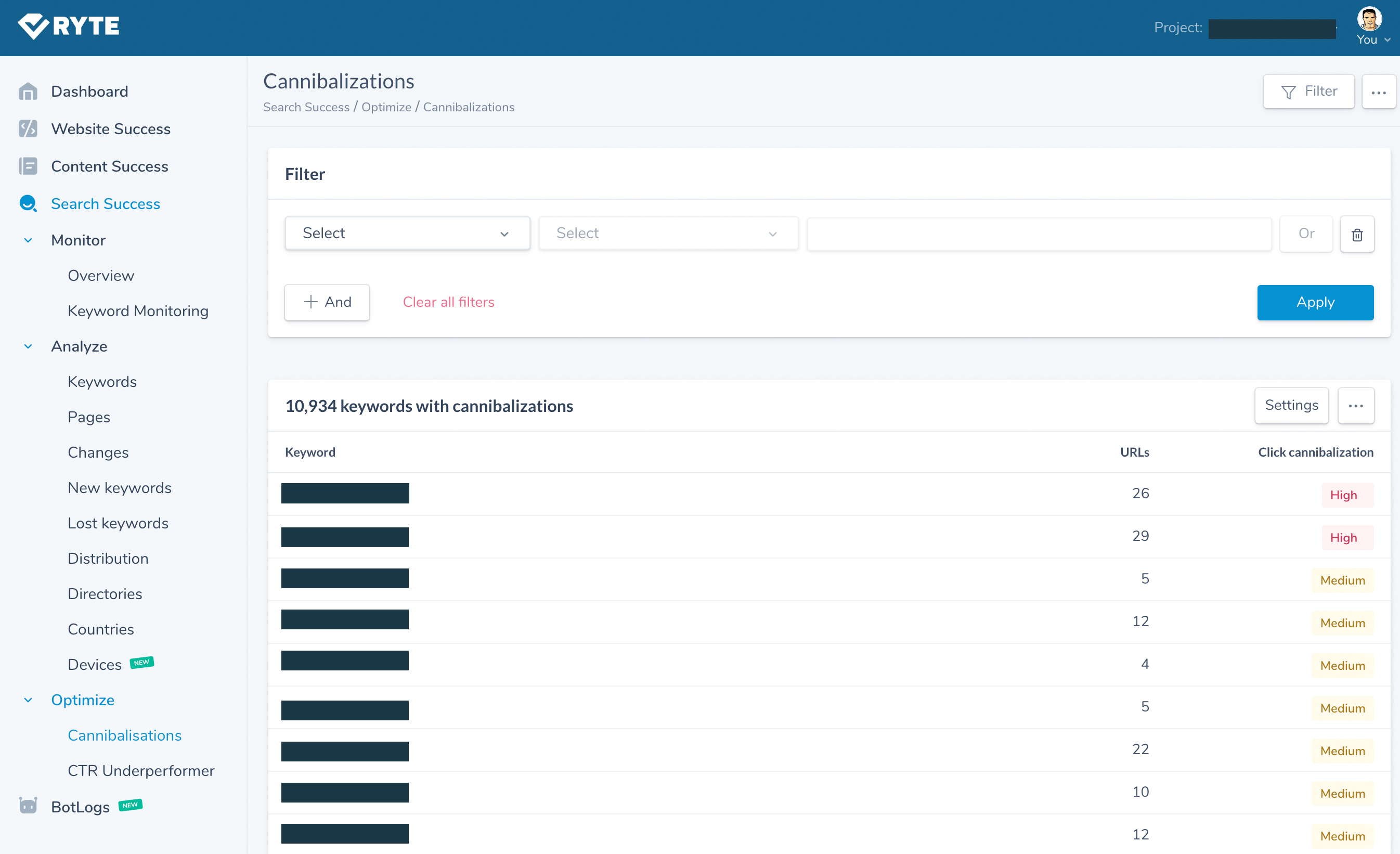
Ryte can also automatically detect keyword cannibalisation due to duplicate content with their impressive Search Success tool which is leveraging Google Search Console data:
Screaming Frog
Screaming Frog needs absolutely no introduction as the most popular crawling tool available in the market.
Prior to exporting the data and analysing your crawl data (there are some really novel ways to analyse Screaming Frog data emerging: check this out), there are some useful things you can check in Screaming Frog’s own UI.
Check for duplicate titles, meta descriptions, H1s and H2s
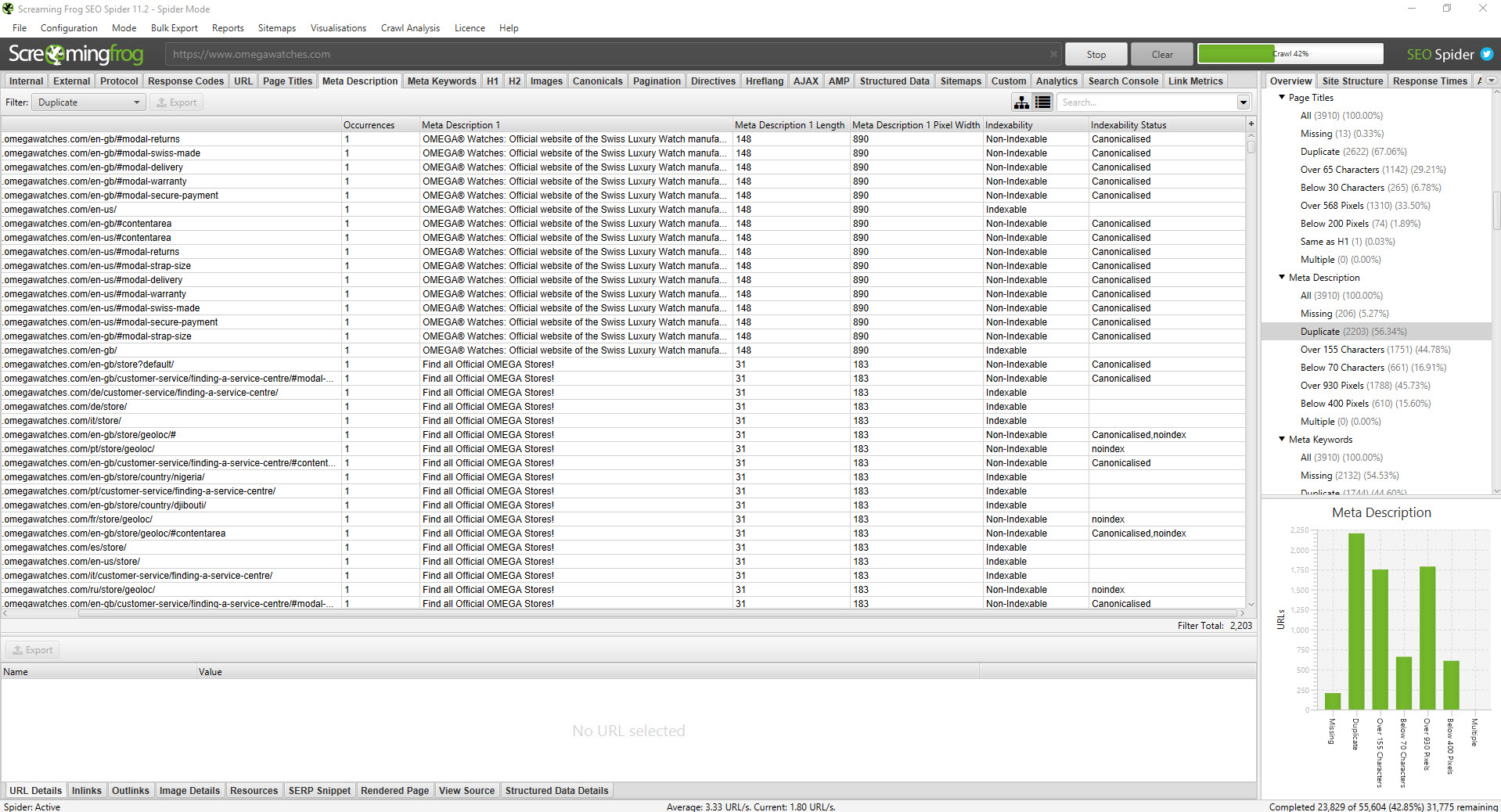
Screaming Frog can give you an early sign of any issues to check – starting with duplicated titles, meta descriptions, H1s and H2s. After you select the “Page Titles” tab (or “H1” / “H2”), the overview dialogue on the right of the screen provides a count of each individual item. You’ll be able to sort the data by duplicates from there.
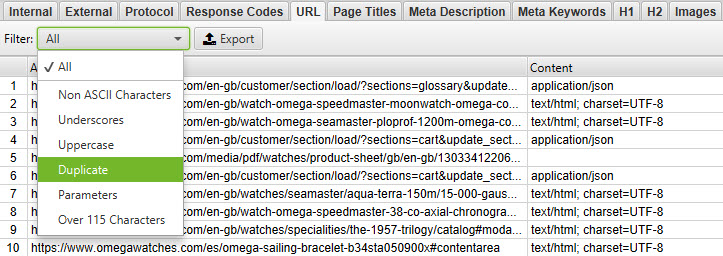
You can also filter by duplicates using the drop down in the top left hand corner. In the screenshot above, we’re filtering by duplicate URLs.
Personally I like to export the data and review in Excel. On an initial audit, you can sort by URL (a-z) which will group similar or very similar URLs together. You can highlight duplicates too.
Combined with SEO Tools for Excel, you can use XPath queries to extract snippets from the page’s source that would identify a page as a duplicate too.
Sitebulb
Sitebulb is a such a weapon. Unlike Screaming Frog, which tends to focus on data collection, Sitebulb performs a lot of analysis. It’s almost an out of the box audit solution. It’s good for tracking improvements to issues that you’ve previously identified in earlier audits. I like it, you should buy it.
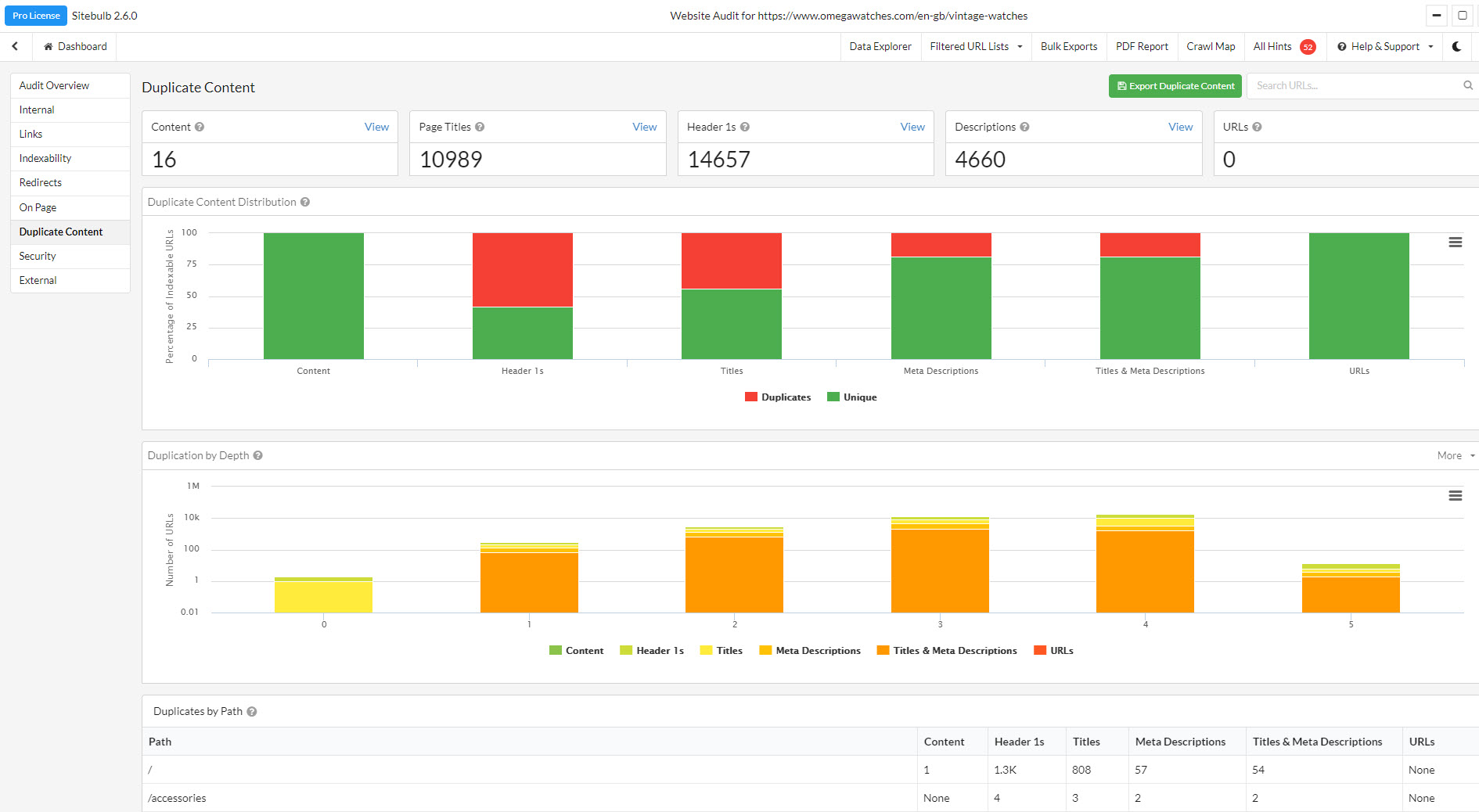
Sitebulb’s “High Priority” duplicate content reports are really valuable out of the box and include:
- URLs with duplicate content
- URLs with similar content
- URLs with duplicate page titles
- Technically duplicate URLs
- URLs with duplicate title and meta descriptions
Deepcrawl
Deepcrawl is a powerful, enterprise scale technical SEO platform. Again it’s already very popular so I hardly need to sell the thing to you. Suffice it to say, it provides insights into duplicate content via its “Content” reporting:
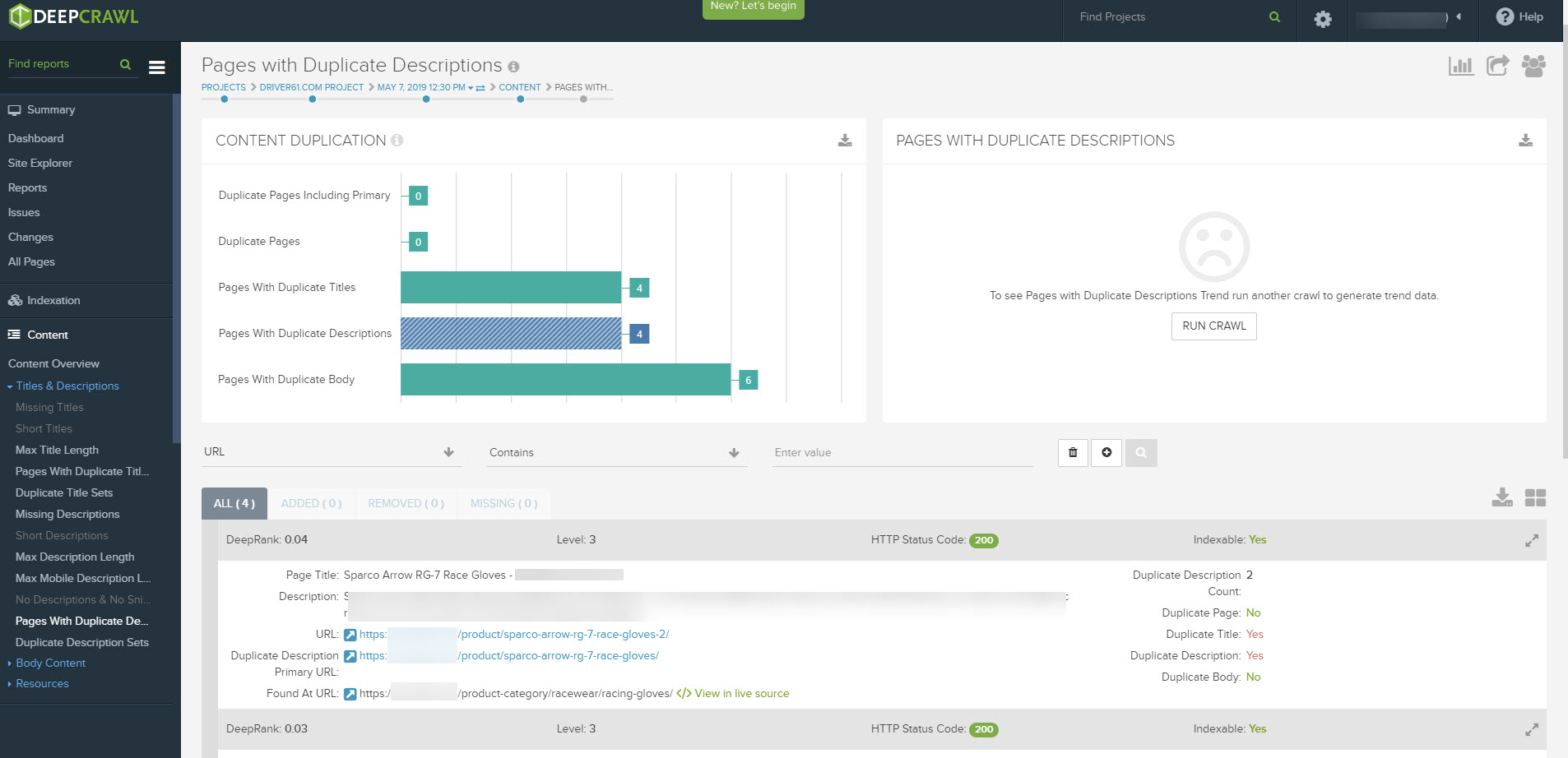
The Pages with Duplicate Content report on Deepcrawl, identified two very similar product pages for the same product on this retail site.
OnCrawl
While I’m not an Oncrawl customer, I know it’s a highly regarded platform. It looks like they have some interesting reporting:
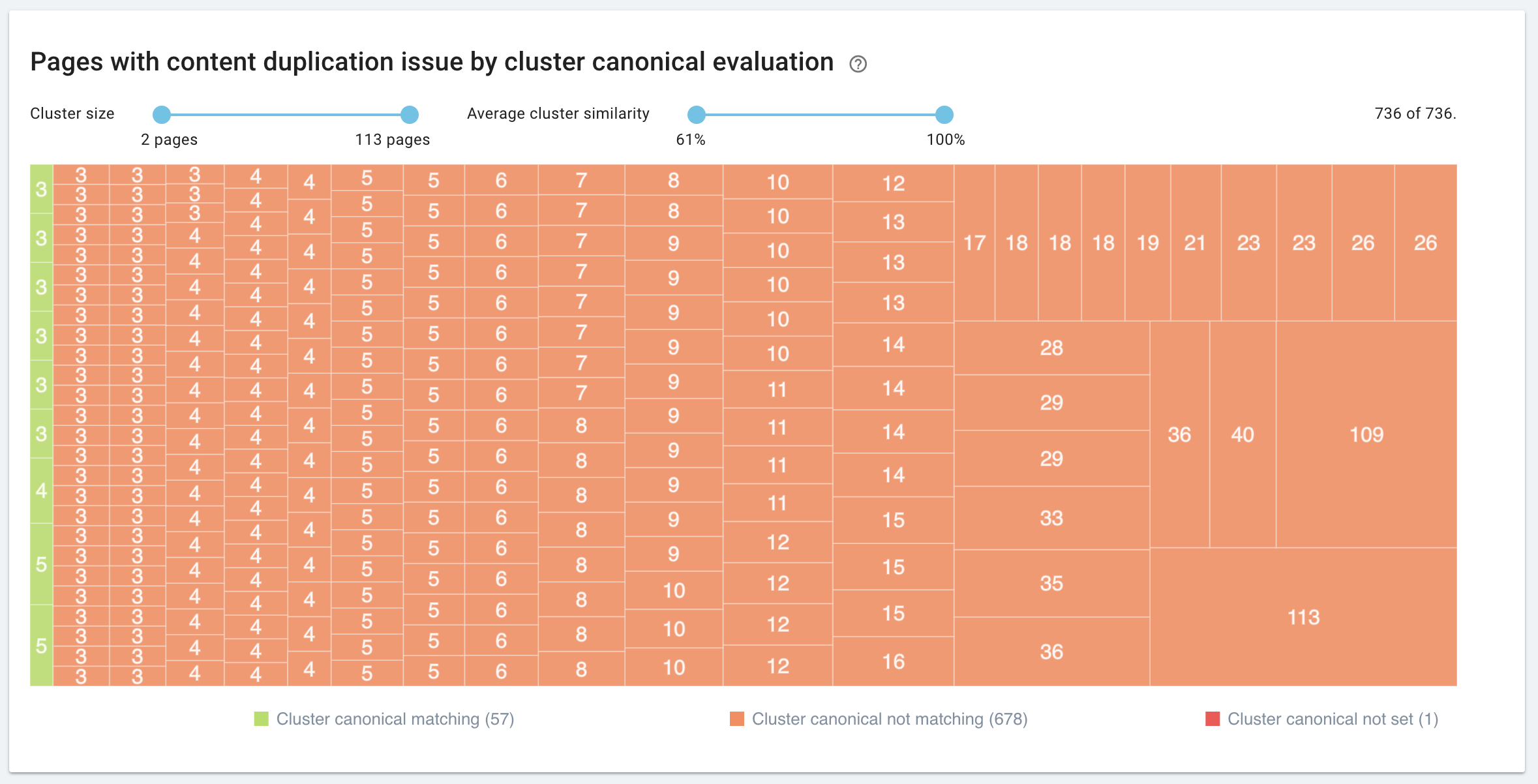
You can learn more about that here.
SEMrush
SEMrush has a simple Site Audit feature included in their subscription. As an added extra, my view is that it’d be stupid not to leave an occasional site audit running, just in case something new crops up:
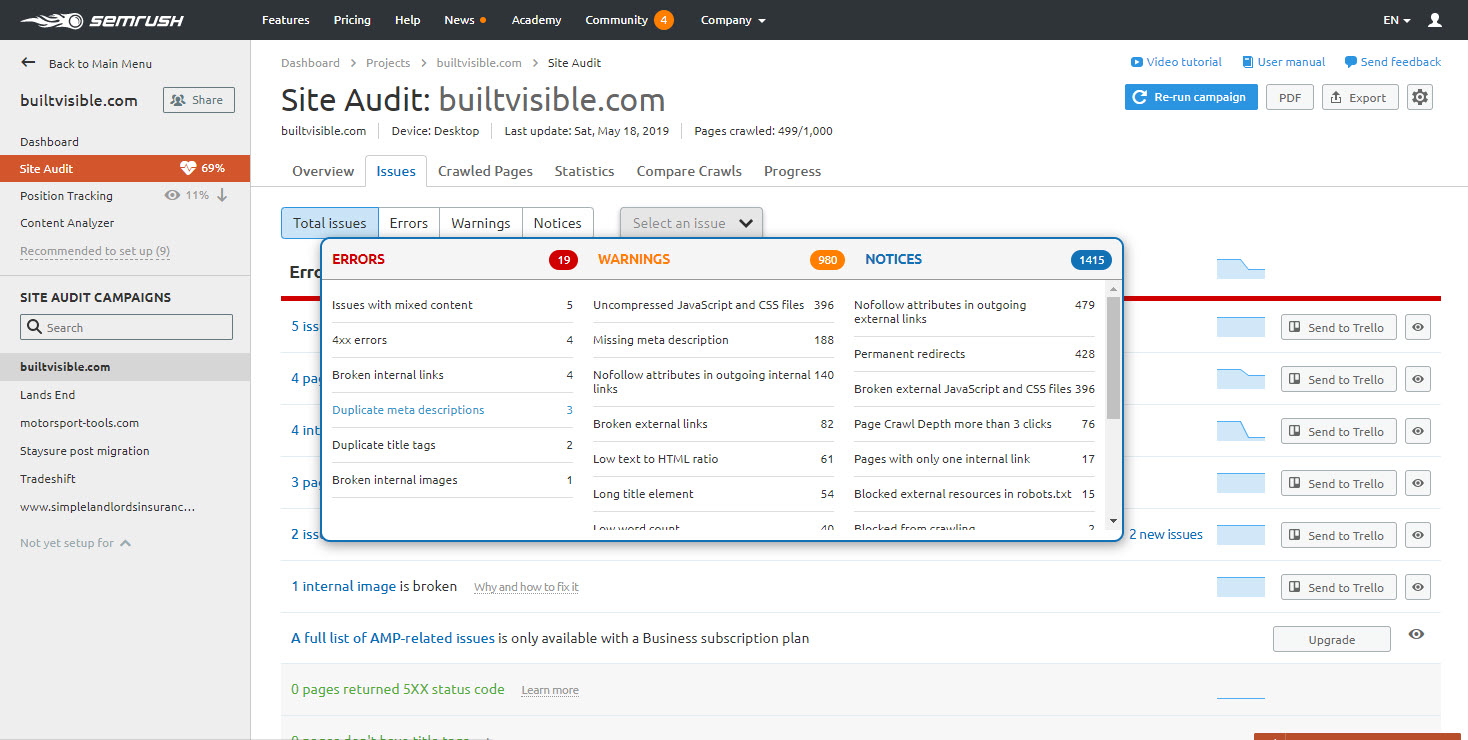
aHrefs
Like SEMrush, aHrefs have a site audit tool too. My account has a 10,000 page limit but for most sites that’s probably a big enough sample to learn everything you need to know.
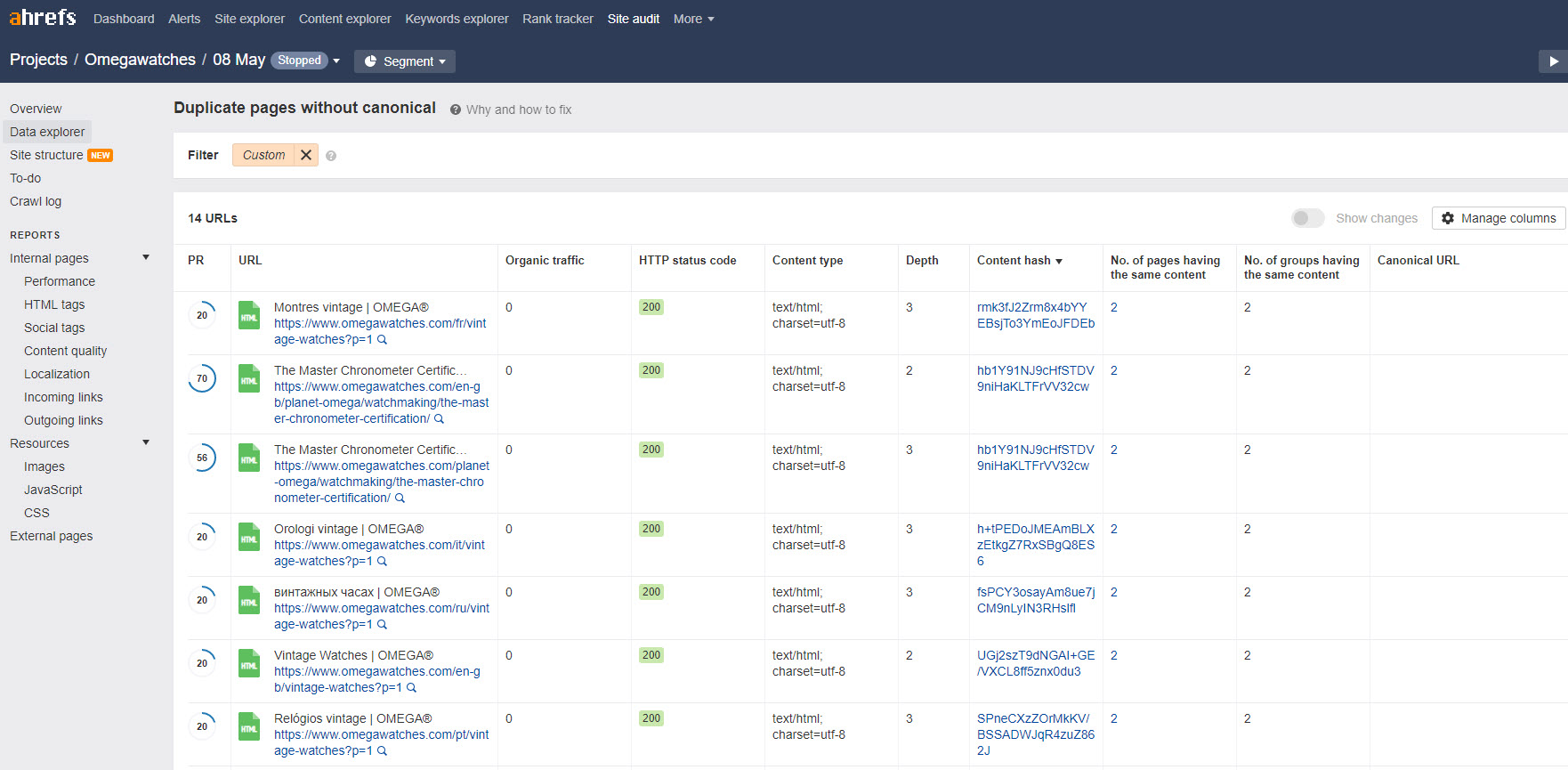
Something this platform seems to have that SEMrush doesn’t is a “Localization” report that looks at errors in your href lang implementation. Sadly that data doesn’t find its way into their Duplicate Content report; as aHrefs tends to see localised versions of a page as a duplicate. To be absolutely fair, most of these tools have that problem.
Google Search Console
Google Search Console have a few duplicate content warnings in their Coverage report:
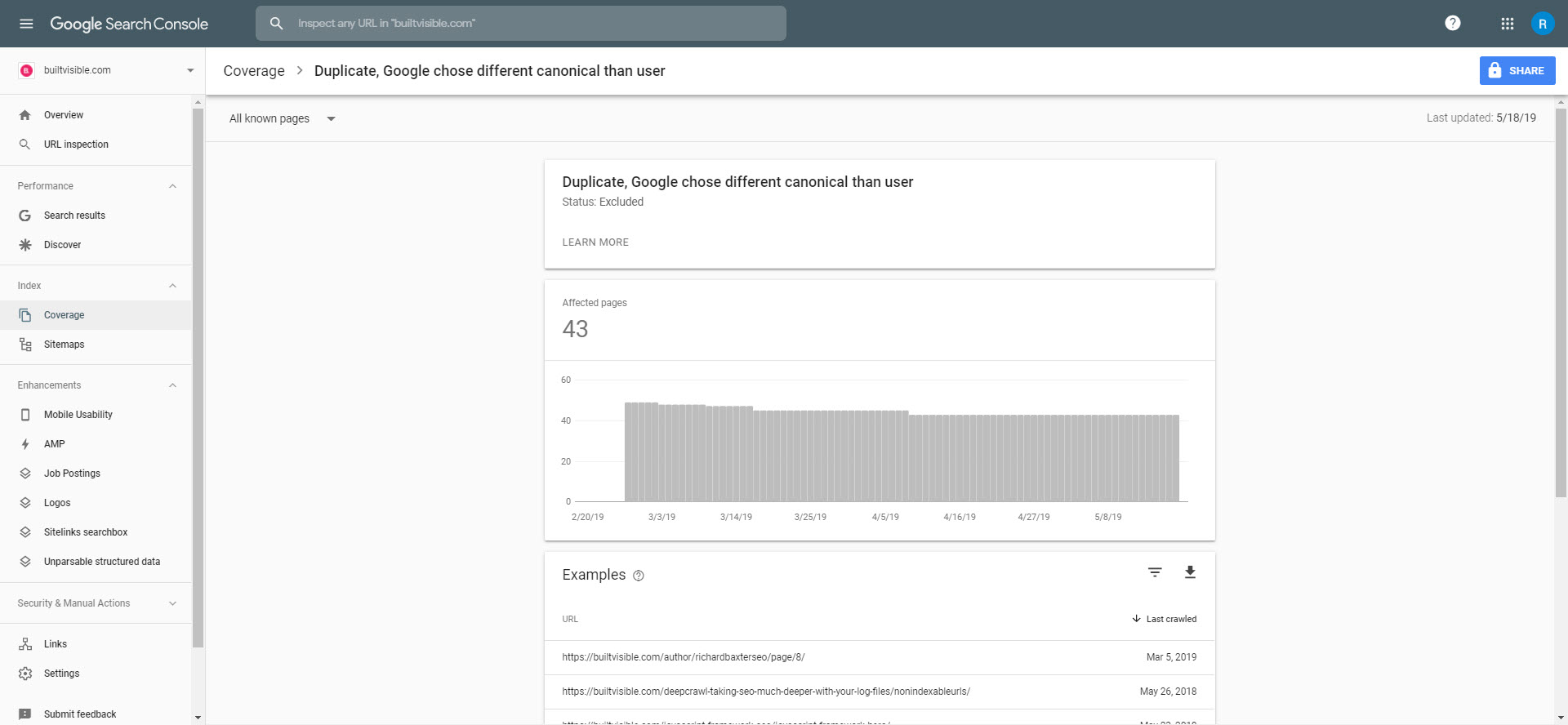
“Duplicate, Google chose different canonical than user” can reveal potential problems with the rel canonical configuration of a site.
Honourable Mentions
I don’t use every SEO tool on the planet, but that doesn’t mean the others aren’t good. I’ve heard great things about: Netpeak Spider, Serpstat and Alexa’s new Site Audit tool. I discovered Siteliner while writing this article and absolutely love it – best of all, it’s free.
Identifying duplicate and cannibalised pages in a large site architecture
Obviously then, there are lots of tools that offer reporting on duplicate content. In my experience though, they’re generally limited to specific elements of a page or can only offer limited insights into the hundreds (100’s) or thousands (1,000’s) of pages. There can be limitations at scale (into the millions of pages) and they don’t always translate into whether the content of the page in its entirety (or at its core) is a duplicate of another, or whether it’s just a case of keyword cannibalisation caused by an problem like the same title tags or H1 headings.
For large ecommerce sites, in particular, this lack of specificity in a classification of what’s duplicate vs cannibalised vs unique can be a real problem.
Using ranking data
One effective method for addressing internal cannibalisation is through ranking data. When tracked over time, the data will show instances where multiple URLs are competing for the same keyword. This results in fluctuation and devaluation in rankings when they continue to swap in and out of organic search.
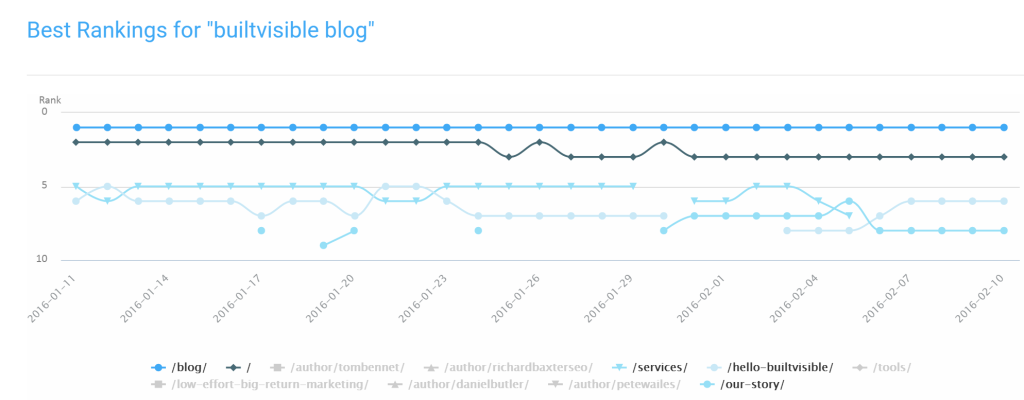
This approach has been discussed a number of times and whilst highly effective, it’s still limited to just analysing URLs that are ranking.
For a more complete picture, here’s a processes we used recently to help solve this problem for a large ecommerce site.
Data collection
The process all stems from a database export of all categories and subcategories on the domain. We could download all the urls from XML sitemaps or running a crawl, but what we’re interested in here is the actual logging system used behind the scenes to describe each of the URLs and its relationship to other categories. This is something that cannot be achieved via a crawl for a site that features all URLs in root directories and no breadcrumb trails to scrape.
This gave us a CSV export containing around 10,000 URLs with the following columns:
- Category ID – the unique ID for the page
- Parent ID – the unique ID for the parent category for which this page is associated
- Description – the database name given to the page
Using these details we could recreate the URL paths. This gave us a clear understanding of the position of each page within the site architecture.
Exploring your data
Next, we performed a CountIF on the description so we could begin grouping URLs together based on their naming convention. This alone can be enough to locate cannibalisation issues. After this point, it was a case of looking for a unique identifier for any category within the HTML page template and scraping the data via Screaming Frog. We went with ‘number of products/results’ for example as seen on Amazon:
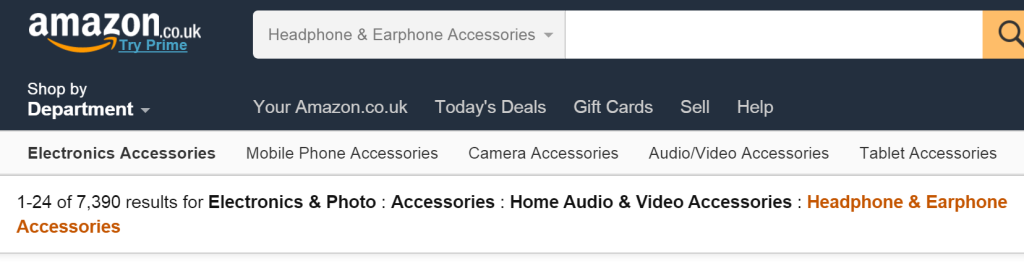
If this isn’t present, scraping the first 3-5 products on the page would also be a good indicator. If memory is becoming a problem, Mike King’s excellent post on hooking up to AWS will solve all your issues.
CountIf was then used to count occurrences of where both the ‘Description’ and ‘Number of Results’ were the same. If the result were just a single instance, then we’re looking at a cannibalisation problem. If greater than 1, we’ve been able to pinpoint duplicate categories.
Here’s a couple of examples along with the formulas used for further context:

To make this process more reliable you could combine the lookup on number of results with the first 3-5 products. This could then be expanded to look outside of instances where the ‘description’ matched, to see if there is any cross contamination via different naming conventions.
Summary
Aside from the myriad recommendations in the article above, there are always best practices you should follow to avoid your site generating duplicate content:
- Always crawl test in staging before you set a site live.
- Keep an eye on your inbound links and set an appropriate redirect strategy to handle outliers.
- Avoid linking internally to tracking parameters (unless a url with a query string happens to be the desired canonical).
- Don’t let search results pages index unless that’s part of your SEO strategy.
- Make sure your sitemap.xml file is a true reflection of your preferred URL structure.
- Always use 301 redirects for old content URLs that you’d like to see updated in the index.
- Implement AMP pages and other alternate content carefully.
- Test your
rel canonicaland international /href langimplementations carefully. - Follow this advice on robots exclusion and URL removal: https://builtvisible.com/wildcards-in-robots-txt/
- Set appropriate rules for
noindexandrel canonicalin category based architectures that use facted navigation. - Have appropriate rules set up http to https, URL case, trailing slash and www / non www redirection:
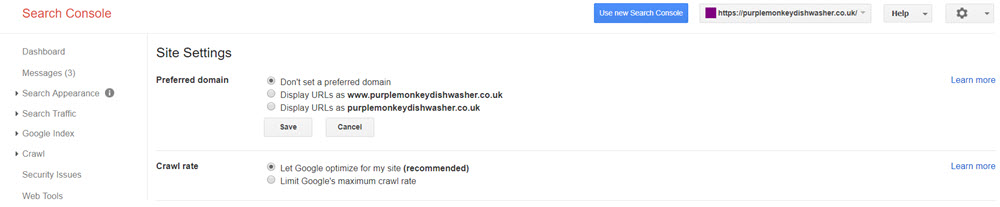
Site settings in (old) Search Console.
- It’s possible to expedite the batch removal of indexed, unwanted duplicate pages by creating a temporary sitemap file (where all URLs are now redirecting or set to
noindex). Submit the sitemap file to Google for a few weeks and then remove the file when the sitemap’s contents has been recrawled.
And finally… Don’t just block access to duplicate content in robots.txt
When you’re dealing with excessive indexed duplication, the less experienced might be tempted to just block crawlers from accessing the URLs in question.
In my experience this locks the content into Google’s index, as it’s there and now it can’t be crawled. Better to set those pages to noindex (or redirect them if they’re no longer needed) and make efforts to get them to be recrawled before blocking the URLs in robots.
Resources and Further Reading
- https://moz.com/blog/mastering-google-search-operators-in-67-steps#section5
- https://www.hobo-web.co.uk/duplicate-content-problems/
- https://edu.google.com/coursebuilder/courses/pswg/1.2/assets/notes/Lesson3.2/Lesson3.2Filetype_Text_.html
- https://edu.google.com/coursebuilder/courses/pswg/1.2/assets/notes/Lesson3.4/Lesson3.4ORandquotes_Text_.html
- https://edu.google.com/coursebuilder/courses/pswg/1.2/assets/notes/Lesson3.5/Lesson3.5IntextandAdvancedSearch_Text_.html
- https://searchengineland.com/myth-duplicate-content-penalty-259657
- https://support.google.com/webmasters/answer/66359?hl=en
- https://yoast.com/duplicate-content/
- https://builtvisible.com/faceted-navigation-seo-best-practices/
- https://webmasters.googleblog.com/2009/10/reunifying-duplicate-content-on-your.html
- https://moz.com/blog/tag-sprawl
- https://www.deepcrawl.com/blog/best-practice/hreflang-101-how-to-avoid-international-duplication/
Max Peters
Fantastic guide Richard and love seeing the recommendation to use Xenu in the old slide deck, such nostalgia!
David
Richard, great article on dupe content mastery. Just wondering how your team managed to desl efficiently with the removal of 2345 offending URLs with the Search Console’s URL removal tool? it could take a day or two?
Richard Baxter
I think the timescale was closer to a few weeks but I must say the url removal tool can be pretty quick (a day or two for individual urls).
Praveen Galagali
WOW. That was a very detailed post about duplicate content. Saved this post for future reference
Jean-Christophe Chouinard
Definitely the absolute guide on duplicate content! Bookmarked :)